Introduction
3D printing has already transformed manufacturing. But 3D printing automation takes it to another level.
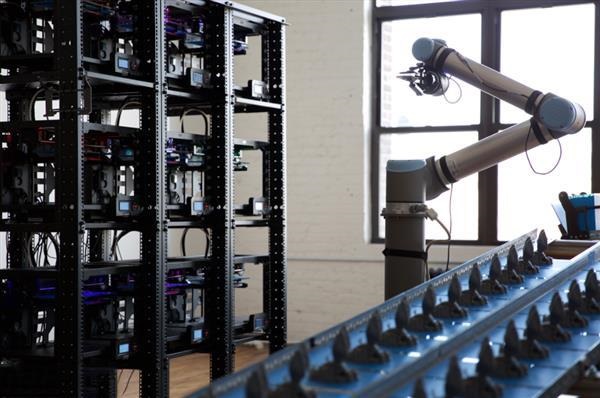
Imagine a factory where printers run 24/7. Robotic arms load materials and remove finished parts. Automated systems inspect every layer as it prints. Software optimizes parameters in real time. Human hands never touch the product until it's complete.
This isn't science fiction. It's happening now.
BMW produces over 400,000 3D-printed parts annually using automated systems. Airbus prints aircraft components that are 50% lighter than traditionally manufactured ones. Medical facilities create patient-specific implants with minimal human intervention.
At Yigu technology, we've seen how automation transforms what's possible with 3D printing. This guide explores how automation works, where it's used, and whether it really is the future of manufacturing.
What Is 3D Printing Automation?
The Basic Idea: Printing Without Human Hands
3D printing automation combines additive manufacturing with automated systems—robotics, sensors, software—to create a workflow that runs with minimal human intervention.
Instead of an operator manually:
- Loading filament or powder
- Starting each print
- Removing finished parts
- Inspecting for defects
- Performing post-processing
Automated systems handle all of it.
What Gets Automated
Material handling: Robotic arms load raw materials into printers. They remove finished parts from build platforms. They transfer parts between stations.
Part removal: When a print finishes, automated systems extract the part. No waiting for an operator. No downtime between prints.
Post-processing: Robots sand, polish, and paint finished parts. Consistent quality, every time. No fatigue, no variation.
Quality control: Sensors monitor prints in real time. Cameras watch each layer. If something goes wrong, the system pauses and alerts—or even corrects itself.
Process optimization: Software analyzes every print, learning and improving. Parameters adjust automatically for better results.
The Role of Software
Software ties everything together:
- CAD for design
- Slicing with automated parameter optimization
- Production scheduling across multiple printers
- Real-time monitoring and control
- Data analysis for continuous improvement
In a fully automated setup, software is the brain. Hardware is the body.
How Does 3D Printing Automation Work?
Step 1: Digital Design
Everything starts with a 3D model created in CAD software. Engineers design parts with precision—every dimension, every feature.
For automated production, designs are optimized for:
- Printability: Minimal supports, ideal orientation
- Consistency: Predictable behavior across multiple prints
- Integration: Features that work with automated handling
Step 2: Material Handling
Robotic systems take over:
- Filament spools loaded automatically when low
- Powder replenished in powder-bed systems
- Build platforms prepared and positioned
No human intervention needed.
Step 3: Printing with Automated Control
The printer runs under constant monitoring:
Temperature control: Sensors track nozzle or bed temperature. Automated systems adjust heating elements to maintain optimal ranges.
Print speed: For complex geometries, speed slows automatically. For simple sections, it increases. Optimized for quality and efficiency.
Layer monitoring: Cameras or sensors watch each layer as it prints. If a layer delaminates or extrusion fails, the system detects it immediately.
Error correction: Some systems can self-correct minor issues. For major problems, they pause and alert.
Step 4: Automated Part Removal
When printing finishes:
- Robotic arms extract the part from the build platform
- Parts are placed on conveyor belts or in collection bins
- Build platforms are cleaned and prepared for the next print
- New material is loaded automatically
Continuous operation. No downtime.
Step 5: Automated Post-Processing
Parts move to post-processing stations:
- Support removal by robotic tools
- Sanding and polishing by automated systems
- Painting or coating with precise control
- Assembly of multi-part components
Step 6: Automated Quality Control
Finished parts are inspected:
- Vision systems check dimensions and surface finish
- Sensors verify material properties
- Data logging creates a complete record for each part
Defective parts are automatically rejected. Good parts move to packaging.
What Are the Benefits of 3D Printing Automation?
Increased Productivity
Automated systems run 24/7. No breaks. No shifts. No downtime between prints.
A single automated setup can produce what would require multiple manual systems—and multiple operators.
BMW produces over 400,000 parts annually through automated 3D printing. That's thousands of parts per day, with minimal human intervention.
Consistent Quality
Automated systems don't get tired. They don't have off days. Every part is printed with the same precision, inspected with the same attention.
Real-time monitoring catches defects immediately. Issues are corrected before they affect multiple parts. Scrap rates drop.
Reduced Labor Costs
One operator can oversee multiple automated printers. Instead of hands-on work, they monitor systems and handle exceptions.
For high-volume production, labor savings are substantial.
Faster Turnaround
Automated systems don't wait. When one print finishes, the next starts immediately. Post-processing happens in parallel. Parts move through the workflow continuously.
Lead times shrink from weeks to days—sometimes hours.
Scalability
Adding capacity means adding printers and robots, not hiring and training more operators. Automated systems scale linearly.
For growing businesses, this is huge.
Design Freedom with Production Efficiency
Automation doesn't sacrifice 3D printing's design freedom. Complex geometries, internal channels, and organic shapes are still possible—now produced at scale.
Where Is 3D Printing Automation Used?
Automotive Industry
Automotive manufacturers were early adopters of 3D printing automation.
BMW: Produces over 400,000 parts annually. Their automated systems print:
- Robot grippers: 20-30% lighter than traditional ones
- Custom tools: Designed for specific production tasks
- Prototypes: Rapid iteration for new models
- Small-batch production: Limited-run components
The lighter grippers move faster, shortening cycle times. The automated workflow means parts are always available when needed.
Tesla: Explores 3D printing for complex electric vehicle components. Automation enables rapid prototyping and production of parts with geometries impossible to machine.
Medical Field
Medical applications benefit enormously from automation.
Personalized prosthetics: Scan a patient's residual limb. Design a custom socket. Print it automatically. No manual intervention, perfect fit every time.
Implants: Dental implants, orthopedic components—each tailored to individual anatomy. Automated systems produce them consistently, with full traceability.
The IDC projects significant growth in medical 3D printing, driven by personalized devices. Automation makes this economically viable.
Aerospace
Aerospace demands lightweight, complex parts. 3D printing automation delivers.
Airbus: Prints components that are up to 50% lighter than traditionally manufactured ones. Weight savings translate directly to fuel savings.
Spare parts: Automated systems can print replacement parts on demand. No need to stock components for decades. Print what you need, when you need it.
NASA: Explores 3D printing in space. Automated systems could manufacture tools and parts during long missions. No waiting for resupply from Earth.
Consumer Goods
Custom products: Footwear, eyewear, accessories—all personalized and printed automatically.
Small-batch production: Limited editions without tooling costs. Automated systems make small runs economical.
Rapid prototyping: Iterate designs overnight. Test in the morning. Refine and print again. Automation accelerates the entire process.
Industrial Manufacturing
Tooling: Jigs, fixtures, and end-of-arm tools printed on demand. When production changes, print new tools. No inventory, no waiting.
Spare parts: Print replacements for legacy equipment. No need to stock parts that might never be needed.
What Are the Challenges?
Initial Investment
Automated 3D printing systems are expensive. Printers with robotic integration, automated material handling, and quality control systems cost hundreds of thousands to millions of dollars.
For small businesses, this is prohibitive. Many will use service bureaus rather than invest in their own systems.
Complexity
Automated systems are complex. They require:
- Skilled operators who understand both printing and automation
- Regular maintenance to keep everything running
- Software expertise to optimize workflows
- Troubleshooting skills when things go wrong
It's not as simple as buying a printer and pressing "print."
Integration with Existing Workflows
Most manufacturers have existing processes. Integrating automated 3D printing isn't always straightforward. It may require:
- Changes to material sourcing
- New quality control procedures
- Training for existing staff
- Coordination with other production steps
Material Limitations
Not all materials work well in automated systems. Some require careful handling. Others have inconsistent properties. The range of automation-compatible materials is growing but still limited.
Standardization
Industry standards for automated 3D printing are still evolving. Certification for critical applications—aerospace, medical—can be challenging without established standards.
How Does 3D Printing Automation Compare to Traditional Automation?
| Aspect | Traditional Automation | 3D Printing Automation |
|---|---|---|
| Tooling | Expensive molds, dies, fixtures | No tooling—print directly |
| Design changes | Costly retooling | Free—update digital file |
| Complexity | Limited by tool access | Unlimited—any geometry |
| Customization | Difficult and expensive | Free—each part can be different |
| Setup time | Long (tooling, fixturing) | Short (load file, start) |
| Production volume | Economical at high volume | Economical at low to medium volume |
| Material options | Very wide | Growing but limited |
| Initial investment | Very high for complex parts | High but decreasing |
Traditional automation wins for:
- High-volume production of simple parts
- Very wide material selection
- Established processes and standards
3D printing automation wins for:
- Complex geometries
- Customization
- Low to medium volumes
- Rapid iteration
Yigu Technology's Perspective
At Yigu technology, we've watched 3D printing automation evolve from experimental to essential. Here's what we've learned:
Automation isn't for everyone. For small shops and occasional users, manual operation still makes sense. The investment in automation requires volume to justify.
But for production, it's transformative. Clients who need hundreds or thousands of parts benefit enormously. Consistent quality, faster turnaround, lower per-part costs.
Integration is key. Automation works best when integrated into a complete workflow—from design to delivery. Piecemeal automation helps but doesn't deliver full potential.
Material matters. Not all materials behave well in automated systems. We guide clients to choices that work reliably.
Applications we serve:
- Production runs for automotive and industrial clients
- Medical devices requiring traceability and consistency
- Aerospace components with certification requirements
- Consumer products needing customization at scale
3D printing automation isn't the future—it's the present. The question isn't whether to adopt it, but when and how.
Conclusion
3D printing automation combines the design freedom of additive manufacturing with the efficiency of automated production.
Benefits include:
- Increased productivity: 24/7 operation, no downtime
- Consistent quality: Automated monitoring and control
- Reduced labor costs: One operator overseeing multiple systems
- Faster turnaround: Continuous workflow, minimal delays
- Scalability: Add capacity by adding printers, not people
- Design freedom: Complex geometries produced at scale
Applications across automotive, medical, aerospace, consumer goods, and industrial sectors prove the value. BMW produces hundreds of thousands of parts annually. Airbus prints components 50% lighter than traditional ones. Medical facilities create patient-specific implants automatically.
Challenges remain—initial investment, complexity, integration, material limitations. But for the right applications, the benefits far outweigh the challenges.
Compared to traditional automation, 3D printing automation wins on flexibility, customization, and complexity. Traditional automation wins on high-volume simplicity.
The future of manufacturing isn't all one or the other. It's both—traditional and additive, manual and automated, working together.
3D printing automation is absolutely part of manufacturing's future. The only question is how quickly it becomes part of yours.
FAQ
What materials can be used in 3D printing automation?
Common materials include:
- Plastics: PLA, ABS, PETG, nylon—each with different properties for different applications
- Metal powders: Stainless steel, aluminum alloy, titanium alloy—for high-strength parts
- Resins: Standard, photosensitive, hard—for high-detail SLA printing
Material choice depends on the application, the printing technology, and whether the material behaves reliably in automated systems.
How accurate is 3D printing automation?
Accuracy depends on the printer and technology:
- High-end industrial printers: ±0.05–0.1 mm
- Consumer-grade printers: ±0.1–0.4 mm
Factors affecting accuracy include printer quality, printing technology (SLA generally more accurate than FDM), and model complexity. Automated monitoring helps maintain accuracy throughout production runs.
Is 3D printing automation suitable for mass production?
For certain applications, yes. 3D printing automation excels at:
- Low to medium volumes where tooling costs can't be justified
- Highly complex parts that can't be made traditionally
- Customized products where each part is different
- Rapid response manufacturing where speed matters
For high-volume simple parts, traditional methods remain more economical. The sweet spot is complexity, customization, and moderate volume.
What's the cost of 3D printing automation?
Costs vary widely:
- Entry-level automated systems: $50,000–100,000
- Industrial automated systems: $200,000–1,000,000+
- Fully integrated production lines: Millions
For most companies, starting with automated printers and adding robotics incrementally makes sense. Service bureaus offer access without capital investment.
How do I get started with 3D printing automation?
Start by:
- Identifying applications where automation adds value
- Starting with semi-automated systems—printers with basic monitoring
- Adding robotics for material handling and part removal
- Integrating software for workflow management
- Scaling gradually as volume justifies investment
Working with an experienced partner like Yigu technology can help navigate the transition.
What industries benefit most from 3D printing automation?
Industries gaining the most include:
- Automotive: Production parts, tooling, prototypes
- Medical: Custom implants, prosthetics, surgical guides
- Aerospace: Lightweight components, spare parts
- Consumer goods: Custom products, small-batch production
- Industrial manufacturing: Tooling, fixtures, replacement parts
Any industry needing complex, customized, or low-to-medium volume parts should explore automation.
Contact Yigu Technology for Custom Manufacturing
Ready to explore 3D printing automation for your production needs? Yigu technology specializes in custom manufacturing with automated 3D printing systems.
We offer:
- Free quotes within 24 hours—just send your CAD file
- Design for automated production—optimizing your parts for success
- Multiple technologies—FDM, SLA, SLS, metal
- Automated workflows—from print to post-processing
- Quality control—automated inspection and traceability
- Production runs—from prototypes to thousands of parts
Contact us to discuss your project. Tell us what you're making and what it needs to do. We'll help bring your design to life—automatically.