Introduction
Polycarbonate (PC) is the material engineers dream about. It is strong—really strong. It resists heat. It can be crystal clear. It stands up to impacts that shatter other plastics.
But 3D printing PC is notoriously difficult. The filament clogs. Layers peel apart. Parts warp beyond recognition. Clear prints come out cloudy. It feels like the material fights you at every step.
The truth is, PC’s exceptional properties come with strict requirements. Unlike PLA or PETG, it demands precise temperature control, a stable environment, and specialized techniques. Get it right, and you produce parts that rival injection molding. Get it wrong, and you waste hours of printing.
In this guide, we will walk through everything you need to know. You will learn why PC performs so well, how to set up your printer, and what techniques prevent failure.
Why Does PC Stand Above Other Materials?
Strength and Impact Resistance
PC is legendary for its toughness. Its tensile strength of 65–70 MPa far exceeds PLA (30–60 MPa) and ABS (20–40 MPa). But strength is only part of the story.
The real standout is impact resistance. PC is virtually unbreakable under normal conditions. It absorbs sudden shocks without cracking. This makes it ideal for protective gear, machine guards, and tool housings.
Key fact: A PC part can withstand impacts that would shatter ABS or PLA. This is why PC is used for bulletproof glass and safety visors.
Thermal Stability
PC handles heat that would destroy other filaments. Its glass-transition temperature is 147°C. The continuous use temperature reaches 120°C.
Compare that to other materials:
| Material | Max Continuous Use Temp | Glass Transition Temp |
|---|---|---|
| PC | 120°C | 147°C |
| ABS | 90°C | 105°C |
| PETG | 80°C | 80°C |
| PLA | 60°C | 60°C |
Real-world example: An automotive supplier needed a sensor housing for an engine compartment. Temperatures reached 110°C. ABS would have softened. PC held its shape perfectly.
Optical Clarity
PC is naturally transparent. It offers optical clarity second only to glass among 3D printing materials. This makes it perfect for lenses, light covers, and display enclosures.
Key fact: With proper post-processing, PC prints can achieve 90 percent transparency, approaching the clarity of glass.
Chemical Resistance
PC resists most oils, alcohols, and weak acids. It stands up to industrial environments where other plastics degrade. However, it is vulnerable to solvents like acetone, so cleaning requires care.
What Printing Techniques Tame PC?
Temperature Control: The Non-Negotiable
PC requires high temperatures. This is not optional.
| Parameter | Required Range | Why It Matters |
|---|---|---|
| Nozzle temperature | 260–300°C | Below 260°C causes under-extrusion and weak layers. Above 300°C degrades the material. |
| Bed temperature | 100–120°C | Essential for first-layer adhesion. Too low, and the part pops off. |
| Chamber temperature | 60–80°C | Prevents warping by slowing cooling. Without an enclosure, PC warps almost every time. |
Key fact: A standard PTFE-lined hot end cannot reach 300°C. You need an all-metal hot end to print PC safely.
Cooling Control
PC needs minimal cooling. Set the part cooling fan to 0–20 percent. Excessive cooling causes rapid solidification, leading to poor layer adhesion and brittle parts.
Let the material cool gradually inside the enclosed chamber. This preserves strength and dimensional accuracy.
Print Speed
Slow down. PC prints best at 20–40 mm per second. Faster speeds prevent proper layer bonding. The result is weak parts that delaminate under stress.
Real-world example: A manufacturer printing PC brackets found that reducing speed from 60 mm/s to 30 mm/s increased part strength by 40 percent in tensile tests.
Layer Adhesion
Strong layer bonds are critical. Use a layer height of 0.1–0.2 mm with a 0.4 mm nozzle. This maximizes contact between layers.
If layers separate easily, increase nozzle temperature by 5–10°C. For the first layer, use a slightly higher flow rate (105–110 percent) to lock it to the bed.
Support Structures
PC supports are hard to remove. For complex geometries, use soluble supports like PVA. PVA prints at 210–230°C and dissolves in water, leaving the PC part intact.
If using PC for supports, add a 0.1 mm gap between the support and the model. This makes removal easier without damaging the part.
What Materials Work with PC?
Bed Adhesion Solutions
Getting PC to stick to the bed is half the battle. Common solutions:
| Solution | Effectiveness | Notes |
|---|---|---|
| PEI sheet | Excellent | The most reliable option for PC |
| Magigoo PC | Very good | Designed specifically for polycarbonate |
| Hairspray on glass | Good | Cheap and effective with proper application |
| Blue painter’s tape | Fair | Works for small parts only |
Key fact: A PEI sheet with a thin layer of hairspray provides the strongest adhesion for PC prints. The part should release easily once the bed cools.
Filament Quality
Not all PC filaments are equal. Look for:
- High purity – Contaminants cause clogs and weak spots
- Consistent diameter – Variations of more than ±0.05 mm cause extrusion issues
- Dried packaging – PC absorbs moisture quickly. Wet filament prints poorly.
Real-world example: A user switched from a budget PC filament to a premium brand. The same print settings produced parts with 50 percent higher impact strength and no warping.
How Do You Prevent Common Failures?
Warping
Warping is the most common PC failure. It happens when layers cool at different rates, creating internal stress.
Solutions:
- Use an enclosed chamber to maintain 60–80°C
- Ensure bed temperature is 100–120°C
- Add a brim (5–10 mm) to hold corners down
- Avoid printing large, flat parts without breaks
Layer Separation
Layers peel apart when they do not bond fully. This is a temperature problem.
Solutions:
- Increase nozzle temperature by 5–10°C
- Reduce part cooling fan to 0–10 percent
- Print slower (20–30 mm/s)
- Ensure chamber temperature stays above 60°C
Clogs
PC clogs nozzles when it cools inside the hot end or when filament is contaminated.
Solutions:
- Use a hardened steel nozzle (brass wears quickly at 300°C)
- Ensure filament is dry (store in sealed container with desiccant)
- Perform a cold pull between prints to clean the nozzle
Cloudy Prints
PC should print clear, but it often comes out cloudy. This is usually due to moisture or cooling issues.
Solutions:
- Dry the filament thoroughly before printing
- Print with minimal cooling
- Use a higher nozzle temperature for better layer fusion
- Post-process with sanding and polishing
What Applications Suit PC Best?
Industrial Parts and Fixtures
Factories use PC for machine components, conveyor guides, and inspection fixtures. The material withstands daily wear and maintains dimensional accuracy.
Real-world example: A manufacturing plant needed custom inspection fixtures for a new product line. PC printed fixtures held tolerance through thousands of measurements. Machined aluminum fixtures would have cost five times more.
Protective Gear
PC is the standard for safety glasses, face shields, and helmet visors. Its impact resistance and clarity make it the only choice for personal protection.
Key fact: PC safety glasses must pass ANSI Z87.1 impact tests. 3D printed PC parts can meet this standard with proper settings.
Automotive Components
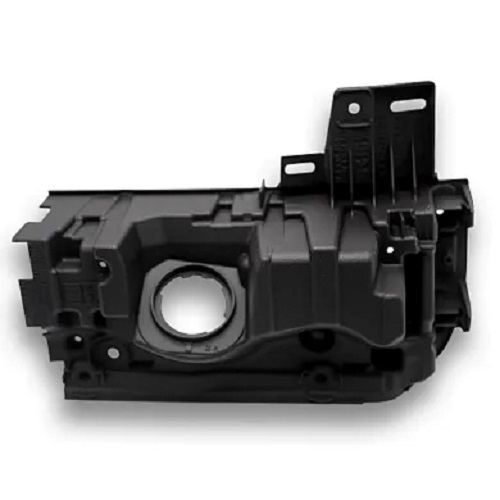
Under-hood temperatures reach over 100°C. PC handles this while resisting oils and vibrations.
Applications:
- Sensor housings
- Light covers
- Air intake components
- Interior trim
Electronics Enclosures
PC offers heat resistance and dielectric properties. It protects sensitive electronics while maintaining dimensional stability.
Real-world example: A drone manufacturer needed lightweight, impact-resistant battery enclosures. PC printed cases survived crashes that shattered ABS versions.
Medical Devices
Medical-grade PC is biocompatible and easy to sterilize. It is used for surgical instrument trays, device housings, and transparent components.
Key fact: Medical-grade PC meets ISO 10993 standards for biocompatibility. It can be sterilized with ethylene oxide or gamma radiation.
How Do You Post-Process PC Parts?
Sanding and Polishing
PC sands well. Start with 200–400 grit sandpaper to remove layer lines. Move to 800–1200 grit for a smooth finish. For optical clarity, finish with 2000 grit and then polish.
Polishing options:
- Plastic polish (Novus, Meguiar’s)
- Buffing wheel with mild abrasive
- Flame polishing (for advanced users only)
Key fact: Proper sanding and polishing can make a semi-transparent PC print 90 percent clear, approaching glass-like clarity.
Annealing
Annealing reduces internal stress and improves strength. Heat the part to 120–130°C in an oven. Hold for 1–2 hours. Cool slowly (turn off the oven and let it cool naturally).
Results:
- Increased impact resistance
- Improved dimensional stability
- Reduced risk of stress cracking
Painting and Bonding
PC accepts paint well. Clean the surface with isopropyl alcohol first. Use acrylic or enamel paints. Avoid solvent-based paints that can cloud the material.
For bonding, PC works with:
- Epoxy – Strong, general-purpose
- Cyanoacrylate (superglue) – Fast, but brittle
- PC-specific adhesives – Melt the surface for a welded bond
Yigu Technology’s Perspective
At Yigu Technology, we print PC parts daily. We have learned that success comes down to controlling the environment.
Case Study: Automotive Sensor Housing
A client needed a sensor housing for an engine compartment. Temperatures reached 115°C. The part required tight tolerances and chemical resistance to oils.
We used an industrial printer with an enclosed chamber at 70°C. Nozzle temperature was set to 285°C. The parts printed without warping and passed all thermal tests. The client received 50 units in one week—half the time and cost of machining.
Case Study: Clear Display Cover
A medical device manufacturer needed a transparent cover for a diagnostic instrument. The part required optical clarity and chemical resistance to cleaning agents.
We printed the cover in PC with minimal cooling. After printing, we sanded and polished the part to 2000 grit. The final cover achieved 85 percent transparency. The client approved the design and moved to production.
Our Approach
We do not guess. We test each batch of filament. We calibrate temperature profiles for each part geometry. We monitor chamber temperature throughout the print.
With PC, the details matter. A 5°C difference in bed temperature can mean success or failure. A 10 mm/s change in print speed affects layer adhesion. We have mapped these variables through years of experience.
Conclusion
3D printing PC is challenging but rewarding. The material offers unmatched strength, heat resistance, and clarity. It enables applications that no other filament can handle.
Success requires the right setup: an all-metal hot end, a heated bed at 100–120°C, and an enclosed chamber at 60–80°C. Print slowly. Cool minimally. Dry your filament.
With these techniques, you can produce PC parts that rival injection molding. They will withstand heat, resist impacts, and—with post-processing—achieve near-glass clarity.
PC is not for beginners. But for those who master it, the payoff is worth the effort.
FAQ
Why is my PC print warping despite using a heated bed?
Warping usually comes from poor chamber temperature control. Ensure your enclosure maintains 60–80°C. Lower the bed temperature slightly (to 100°C) if the part sticks too well. Use a PEI sheet with hairspray for better adhesion. For large, flat parts, add a 10 mm brim to hold corners down.
Can PC be printed on a consumer-grade 3D printer?
It is possible but challenging. You need a printer with an all-metal hot end capable of 300°C. Add an enclosure (acrylic panels work) to maintain chamber temperature. Start with small, simple parts to test settings. Consumer printers without enclosures will struggle with warping on anything larger than a few centimeters.
How do I restore PC’s optical clarity after printing?
Sand the part progressively: 400, 800, 1200, and 2000 grit sandpaper. Then polish with a plastic polish like Novus or Meguiar’s Mirror Glaze. For best results, use a buffing wheel with a mild abrasive compound. Do not skip grits—deep scratches will remain visible if you jump from coarse to fine too quickly.
Contact Yigu Technology for Custom Manufacturing
Need high-performance PC parts? Yigu Technology specializes in 3D printing polycarbonate for demanding applications. We use industrial printers with precise temperature control and enclosed chambers to ensure success.
Contact us today to discuss your project. From automotive components to medical devices, we deliver PC parts that perform.