Resin 3D printing uses light to cure liquid photopolymer into solid, high-detail parts. This guide explains how it works, the different technologies, materials, and tips for success—helping you get the most from your resin prints.
Introduction
Resin 3D printing has revolutionized how we create detailed, high-precision parts. Unlike filament-based printing, resin printing uses liquid photopolymer that solidifies when exposed to light. The result? Parts with smooth surfaces, intricate details, and exceptional accuracy that other methods struggle to match.
From jewelry design to dental applications, resin printing excels where detail matters. But it also requires different techniques, materials, and post-processing than other 3D printing methods. Understanding the process is key to success.
This guide covers everything you need to know—from basic principles to advanced tips—helping you master resin 3D printing for your projects.
How Does Resin 3D Printing Work?
What is the basic principle?
Resin 3D printing, also known as stereolithography (SLA) or digital light processing (DLP) , operates on photopolymerization. This chemical process turns liquid photosensitive resin into solid material when exposed to light—typically ultraviolet (UV) light.
Here's what happens: The resin contains photo-initiators. When UV light hits these initiators, they trigger a chain reaction. The reaction cross-links the resin's monomers, transforming liquid into solid plastic-like material.
The process builds layer by layer. Your 3D model is sliced into thin cross-sections in software. Each slice corresponds to a specific shape. As the light source traces or projects that shape onto the liquid resin, that layer solidifies. Layer upon layer, the object rises from the build platform.
What are the key components of a resin printer?
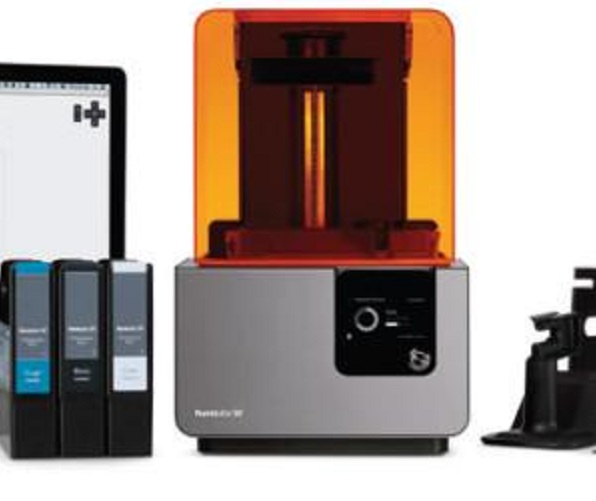
Light Source: This provides energy for photopolymerization. In SLA printers, a focused UV laser traces each layer's shape point by point. In DLP printers, a digital micromirror device (DMD) projects entire layers at once. The light must emit within the right wavelength range—usually 365-405 nm—to cure the resin effectively.
Resin Tank: This holds the liquid photopolymer. It's made of transparent material allowing UV light to pass through. The tank must resist the chemical properties of resins. Some tanks are removable for easy cleaning or resin changes. Tank size determines maximum build volume in X and Y directions.
Printing Platform: This is where solidified resin layers adhere—where your object builds. It starts at the bottom of the tank and moves during printing. After each layer cures, the platform moves a small distance—typically 0.02-0.1 mm—allowing fresh resin to flow in for the next layer. The platform must be flat and stable for accurate layer deposition.
What Are the Different Types of Resin 3D Printing?
Stereolithography (SLA)
SLA is the original resin printing technology—pioneered in the 1980s and still widely used.
Workflow: A UV laser serves as the light source. Your 3D model is sliced into thin layers in software. A galvanometer-based scanning system directs the laser beam, tracing each layer's cross-section onto the resin surface. Where the laser hits, resin cures.
After one layer completes, the build platform moves down—usually 0.02-0.1 mm—and a new resin layer recoats over the cured layer. The process repeats until your object is complete.
Advantages of SLA:
- High Precision: SLA achieves layer thickness as thin as 0.02 mm. This enables highly detailed models. Jewelry designers use SLA to reproduce intricate patterns and delicate details on small pieces.
- Smooth Surface Finish: Cured resin results in relatively smooth surfaces compared to other printing technologies. This suits applications where aesthetics matter—consumer product prototypes, figurines, display models.
Disadvantages of SLA:
- Limited Build Volume: SLA printers generally have smaller build volumes than some other printer types. Large-scale production or big objects face limitations.
- Slow Printing Speed: Point-by-point laser curing makes SLA relatively slow, especially compared to DLP. Complex or large models can take many hours.
Digital Light Processing (DLP)
DLP offers an alternative approach with key differences.
How it Differs from SLA: Both use photopolymerization. The difference lies in the light source and layer curing method. DLP uses a digital micromirror device (DMD) as the light source. Instead of tracing each layer point by point, DLP projects an entire layer of light at once.
The DMD contains thousands of tiny mirrors, individually controlled. These mirrors direct light from a high-intensity lamp to create the exact layer pattern on the resin surface—curing the whole layer simultaneously.
Advantages of DLP:
- Faster Printing Speed: Curing entire layers at once makes DLP significantly faster than SLA, especially for models with many layers. This suits high-volume production of small to medium parts.
- High Resolution: DLP achieves excellent resolution, reproducing fine details accurately. Micro-scale models or parts with intricate geometries benefit from this capability.
Applications:
- Dental Applications: DLP is widely used for dental models, crowns, and bridges. High precision and fast speed enable efficient production of accurate dental prosthetics. A dental lab can produce multiple models for different patients in a single day.
- Jewelry Prototyping: Like SLA, DLP excels at jewelry prototyping. Detailed, smooth-surfaced models help jewelers test designs before production.
| Aspect | SLA | DLP |
|---|---|---|
| Light Source | UV laser (point tracing) | Projected light (whole layer) |
| Layer Curing | Point by point | Entire layer at once |
| Speed | Slower | Faster |
| Precision | Excellent | Excellent |
| Typical Layer Thickness | 0.02-0.1 mm | 0.025-0.1 mm |
| Build Volume | Small to medium | Small to medium |
What Materials Are Used in Resin 3D Printing?
Common resin types
Acrylic Resins: Widely used, offering a good balance of properties. They cure relatively fast under UV light, speeding up printing. Mechanical strength suits general-purpose applications. For consumer product prototypes—keychains, small figurines—acrylic resins are often the go-to choice. They achieve smooth surface finish and come in various colors.
Epoxy-Based Resins: Known for high strength and excellent chemical resistance. Industrial applications—molds for casting small metal parts, components in harsh chemical environments—prefer epoxy-based resins. They resist chemical attacks better than acrylics. However, curing speed is slower, increasing overall print time.
| Resin Type | Curing Speed | Mechanical Strength | Chemical Resistance | Common Applications |
|---|---|---|---|---|
| Acrylic | Fast | Moderate | Moderate | Consumer prototypes, figurines, general use |
| Epoxy-Based | Slow | High | High | Molds, chemical-exposed parts |
Specialized resins
High-Temperature Resistant Resins: These maintain structural integrity at elevated temperatures. Aerospace applications—small brackets, interior parts exposed to high temperatures during flight—use these resins. They withstand temperatures that would deform regular resins. This enables lightweight yet heat-resistant parts.
High-Toughness Resins: Formulated for enhanced resistance to cracking and breakage. Automotive industry uses them for small connectors, interior trim components that endure vibrations and impacts. High toughness ensures long-term function, reducing replacement needs.
Flexible Resins: Create rubber-like parts that bend and stretch. Applications include grips, gaskets, and soft robotics components. Elongation at break can reach 100-500% depending on grade.
Biocompatible Resins: Certified for medical applications. Surgical guides, dental appliances, and medical devices use these materials. They're safe for skin contact and short-term body contact.
What Tips Ensure Successful Resin Printing?
Pre-printing preparation
Check the Equipment: Before starting, thoroughly inspect your printer. Ensure all moving parts—linear actuators, platform motors—work properly. If the build platform doesn't move smoothly, layers may misalign, causing print failure. Clean optical components—lenses in SLA printers, DMD in DLP printers. Dust or debris affects light projection quality and resin curing.
Calibrate the Platform: Proper platform calibration is essential. Use built-in calibration tools to ensure the platform is parallel to the resin tank. If not level, layer thickness varies across the model, resulting in distortion. Most printers have step-by-step calibration—adjusting screws or using sensors to measure distance between platform and light source.
Prepare the Resin: Ensure resin is at the right temperature. Viscosity is temperature-dependent. Too cold—resin thickens, making it difficult to flow evenly during recoating. Too warm—resin may cure too quickly or become unstable. Most resins work best at room temperature (around 25°C), but check manufacturer recommendations. Gently stir resin to distribute any settled pigments or additives evenly.
Printing considerations
Orientation Matters: How you orient your model affects print success and quality. Angle models to reduce large cross-sections that create suction forces. Orient to minimize supports on visible surfaces. Consider where layer lines will appear.
Support Strategy: Supports are necessary for overhangs and islands. But they leave marks when removed. Use appropriate support thickness and density. Too few—prints fail. Too many—more post-processing. Hollow models with drainage holes to reduce material use and suction.
Exposure Settings: Follow resin manufacturer recommendations. Under-exposure causes weak, tacky parts. Over-exposure loses detail and can overcure internal features. Run exposure tests for new resins to dial in settings.
Post-processing
Washing: After printing, objects need washing to remove uncured resin. Isopropyl alcohol (IPA) is the common solvent. Submerge parts for a few minutes, agitating gently. Some printers have built-in washing stations. For others, a container with IPA and tweezers works. Be careful—solvents are flammable. Work in well-ventilated areas.
Curing: Even after washing, parts may not be fully cured. Secondary curing is usually required. Use a dedicated UV curing chamber. Place washed parts inside, expose to UV light for recommended time—typically 10-30 minutes depending on resin and part size. Rotate or position parts so all surfaces get even exposure.
Support Removal: Remove supports carefully after washing but before final curing (supports are slightly softer then). Use flush cutters for clean removal. Sand support nubs with fine-grit sandpaper.
Finishing: For smooth surfaces or to remove support marks, sanding and polishing help. Start with coarse grit (120-200) to remove large bumps, progress to finer grits (400-600-1000) for smooth finish. After sanding, polishing compounds can achieve high-gloss finish. This step matters for aesthetic applications—jewelry, high-end prototypes.
What Are Common Resin Printing Problems?
Failed prints
Print doesn't stick to platform: Level platform properly. Ensure first layer exposure is adequate. Check that platform is clean.
Layer separation: Increase exposure time. Ensure supports are adequate. Check that resin is well-mixed.
Missing features: Check model file for errors. Ensure supports are sufficient for islands. Verify exposure settings.
Quality issues
Rough surfaces: Check layer height settings. Ensure proper orientation. Clean optical components.
Bloated or distorted features: Reduce exposure time. Check that resin isn't overheated. Verify platform stability.
Cloudy or tacky parts: Increase washing time. Ensure adequate curing. Check that resin isn't expired.
Yigu Technology's Perspective
As a non-standard plastic and metal products custom supplier, Yigu Technology highly values resin 3D printing in customized production. This technology enables creation of complex, unique designs difficult to achieve through traditional manufacturing.
We use resin printing to quickly produce prototypes and small-batch customized products—reducing lead time and cost associated with tooling and molding. For applications requiring high detail, smooth surfaces, or translucent properties, resin printing often outperforms other methods.
For the industry's future, resin 3D printing will drive more innovation. It opens new possibilities in aerospace, automotive, and medical fields—where customized, high-precision parts are increasingly demanded. Yigu Technology is committed to leveraging this technology to provide better-quality customized products, meeting evolving customer needs in a dynamic market.
Conclusion
Resin 3D printing offers unmatched capabilities for creating high-detail, smooth-surfaced parts. Whether using SLA's precision or DLP's speed, understanding the process is key to success.
Key takeaways:
- Resin printing uses photopolymerization—liquid resin solidifies under UV light
- SLA uses laser tracing; DLP uses whole-layer projection
- Key components: light source, resin tank, build platform
- Materials range from standard acrylics to specialized high-temp, tough, and flexible resins
- Success requires proper preparation, orientation, supports, and post-processing
- Washing and curing are essential steps—not optional
With the right approach, resin 3D printing delivers parts that amaze—intricate details, smooth finishes, and precision that other methods can't match.
FAQ
Q1: What is the difference between SLA and DLP resin printing?
A: SLA uses a UV laser that traces each layer point by point. DLP projects an entire layer at once using a digital micromirror device. DLP is generally faster; both achieve excellent detail.
Q2: How do I know which resin to choose for my project?
A: Consider your requirements: standard acrylics for general prototypes, epoxy-based for strength and chemical resistance, high-temp for heat exposure, tough for impact resistance, flexible for bendable parts, biocompatible for medical applications.
Q3: Why is post-processing necessary for resin prints?
A: Prints come out covered in uncured liquid resin—washing removes this. Parts aren't fully cured either—secondary UV curing completes the process, achieving final mechanical properties.
Q4: How long does resin 3D printing take?
A: Print time depends on model height (number of layers) and technology. DLP is faster than SLA for the same part. Small parts may take 1-2 hours; larger, complex parts can take 8-12 hours or more.
Q5: Is resin printing safe?
A: Liquid resin can cause skin irritation—wear nitrile gloves when handling. Work in well-ventilated areas. Uncured resin is toxic to aquatic life—dispose properly. Cured parts are generally safe to handle.
Q6: Can I print large objects with resin?
A: Build volumes are typically smaller than FDM printers. Most desktop resin printers handle parts up to 150-200mm in each dimension. Larger industrial systems exist but cost more.
Q7: How do I store resin properly?
A: Keep resin in opaque, airtight containers. Store in cool, dark place (20-25°C). Avoid temperature extremes. Resin typically lasts 12-18 months unopened, 6-12 months after opening. Filter before use if sediment appears.
Q8: What causes print failures in resin printing?
A: Common causes: poor platform leveling, incorrect exposure settings, insufficient supports, resin too cold (viscous), dirty optical components, or model orientation issues.
Contact Yigu Technology for Custom Manufacturing
Ready to explore resin 3D printing for your next project? At Yigu Technology, we combine deep expertise with state-of-the-art SLA and DLP capabilities. Whether you need high-detail prototypes, custom jewelry patterns, dental models, or specialized components, our team delivers precision results tailored to your specifications. Contact us today for a consultation—let's bring your detailed designs to life with resin 3D printing.