
Blogs
Consumer 3D Printing Services

Consumer 3D Printing Services, explained the way we would explain it across a table: what it is good at, what it costs you, and the details that keep the part out of the scrap bin.
Key takeaways
- Dive into the world of Consumer 3D Printing with our shop’s user-friendly solutions—where Desktop 3D Printing meets endless
- At our shop we design Consumer 3D Printing solutions that prioritize accessibility—no technical expertise required.
- Our Consumer 3D Printing process is designed to be straightforward—even if you’ve never used a 3D printer before.
- Our Consumer 3D Printing solutions have helped people turn their ideas into reality—from educators to hobbyists to DIY enthusiasts.
Consumer 3D Printing Services
Dive into the world of Consumer 3D Printing with our shop’s user-friendly solutions—where Desktop 3D Printing meets endless
creativity. From custom gadgets to replacement parts, our affordable systems, high-resolution printing, and easy-to-use software let you turn ideas into physical objects at home. Whether you’re a hobbyist, educator, or DIY enthusiast, we make Personal Fabrication accessible, sustainable, and fun.

Our Capabilities: Making 3D Printing Easy for Everyone
At our shop we design Consumer 3D Printing solutions that prioritize accessibility—no technical expertise required. Our goal is to help you bring your ideas to life with minimal hassle and maximum creativity.
Our core capabilities include:
- User-Friendly Systems: Our desktop 3D printers come with simple setup guides and intuitive controls. Even first-time users can start printing within 30 minutes of unboxing.
- High-Resolution Printing: We offer printers with resolutions as fine as 50 microns (0.05mm), ensuring sharp details for decorative items, educational models, and custom gadgets.
- Diverse Material Options: Choose from a wide range of filaments, including PLA, ABS, PETG, TPU, and wood-filled variants—perfect for different projects (e.g., flexible TPU for phone cases, PLA for eco-friendly decor).
- Easy-to-Use Software: Our proprietary software (compatible with Windows, Mac, and mobile) lets you import designs, adjust settings with one click, and monitor prints in real time. It also includes a library of 1,000+ free ready-to-print designs.
- Affordable Solutions: Our entry-level printers start at $299—far less than industry averages—without compromising on quality. We also offer budget-friendly filament bundles to keep costs low.
| Capability | Our Specification | Industry Average Comparison |
| User-Friendly Systems | 30-minute setup, 24/7 app support | 2+ hour setup, limited support |
| High-Resolution Printing | 50-micron minimum layer height | 100–200 micron layer height |
| Diverse Material Options | 15+ compatible filament types | 5–8 compatible filament types |
| Easy-to-Use Software | 1,000+ free designs, mobile monitoring | No free designs, desktop-only monitoring |
| Affordable Solutions | Entry-level printer: $299 | Entry-level printer: 400–600 |
Process: From Idea to Printed Object in 5 Simple Steps
Our Consumer 3D Printing process is designed to be straightforward—even if you’ve never used a 3D printer before. It takes just five steps to turn your idea into a physical item.
- Design and Modeling: Start with a design—you can create your own using free software like Tinkercad (great for beginners) or download ready-to-use designs from our software library. Our team also offers free design tutorials for common projects (e.g., how to make a custom phone case).
- Material Preparation: Choose the right filament for your project (e.g., PLA for a decorative pot, TPU for a flexible keychain). Load the filament into the printer—our machines have a one-click loading system that avoids tangles.
- Printing and Layering: Open your design in our software, select your settings (e.g., layer height, print speed), and hit “start.” The printer will build your item layer by layer—you can monitor progress via the app (and get alerts if something needs attention).
- Post-Processing: Once printing is done, remove the item from the build plate. Most projects need minimal post-processing: just peel off any support structures (our PLA prints often don’t need supports!) and sand edges if needed for a smooth finish.
- Assembly (if applicable): For more complex projects (e.g., a model airplane), assemble the printed parts using glue or snap-fit connections. Our designs include clear assembly guides to make this step easy.
| Process Step | Average Time Taken | Tips for Beginners |
| Design and Modeling | 30 mins–2 hours | Use free library designs first; start simple |
| Material Preparation | 5–10 minutes | Cut filament at a 45° angle for easy loading |
| Printing and Layering | 1–8 hours (varies by size) | Use the app to pause prints if you need to step away |
| Post-Processing | 5–15 minutes | Use a small tool to remove supports gently |
| Assembly (if applicable) | 15–30 minutes | Test-fit parts before gluing |
Materials: Choosing the Right Filament for Your Project
The right material makes all the difference in Consumer 3D Printing. We offer a range of filaments tailored to different needs—from eco-friendly options to durable, flexible ones.
| Material Type | Key Properties | Best For | Cost Range (Per kg) |
| PLA (Polylactic Acid) | Eco-friendly (plant-based), easy to print, vibrant colors | Decorative items, educational models, beginners | 15–30 |
| ABS (Acrylonitrile Butadiene Styrene) | Durable, heat-resistant, impact-resistant | Replacement parts, outdoor gadgets | 20–35 |
| PETG (Polyethylene Terephthalate Glycol) | Strong, flexible, water-resistant | Food-safe items (e.g., cups), phone cases | 25–40 |
| TPU (Thermoplastic Polyurethane) | Flexible, stretchy, shock-absorbent | Phone cases, keychains, toys | 30–45 |
| Wood-Filled Filaments | Natural wood texture, sandable | Decorative bowls, wall art, rustic crafts | 35–50 |
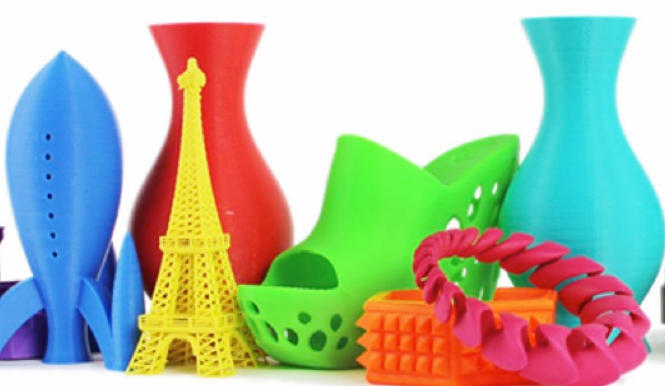
For example, if you’re new to 3D printing, start with PLA—it’s forgiving, doesn’t require a heated build plate, and comes in 50+ colors. If you need a part that can withstand wear (like a replacement appliance knob), ABS is a better choice. For something flexible (like a phone grip), TPU works perfectly.
How to write a spec that gets priced correctly
A drawing is a contract. If it leaves a number open, the shop fills that number in with its own default. The default is rarely the one you had in mind. Put these five lines on every RFQ and most of the back-and-forth disappears before it starts.
- A model and a drawing that agree
- Material by standard number
- Tolerance only where it mates
- Finish and the faces it applies to
- Quantity and required date
The point is not paperwork. Each line removes a decision the shop would otherwise make for you. A complete RFQ comes back priced. An incomplete one comes back guessed.
What actually drives the price
Buyers usually push on material because it is the line they can see. In practice the material is rarely the biggest number on a quote. These five lines decide most of it:
- process choice
- material
- tolerance band
- finish
- volume
Ask for the quote split by line. A supplier who cannot break it down is guessing, and you will pay for the guess. The line you can usually renegotiate is the tolerance band, not the raw material.
Problems you will meet, and the fix
Every process has a failure mode it prefers. The same four show up again and again on this kind of work, and none of them are mysteries once you know what to look for.
- A drawing that contradicts the model
- A tolerance with no datum
- A cosmetic callout with no approved sample
- A quote compared against a different scope
Catch the fault on the first part, not the hundredth. A first-article check costs an hour. A bad batch costs the whole order. Write the check into the purchase order so nobody has to remember it.
What to check on the first article
The first article is the cheapest inspection you will ever buy. Use it properly and the rest of the run becomes boring, which is exactly what you want.
- Every dimension on the drawing, with the measured value written beside it.
- The material certificate, matched to the heat or lot number on the parts.
- The finish against the sample you approved, under the same light.
- Fit against the mating part, assembled rather than measured.
- Packaging, because parts that arrive damaged were never in tolerance.
Check in this order: datums, then mating features, then cosmetic faces. If the datums are wrong, every number after them is noise. Keep the report on file. When a problem shows up in month six, that document is the only thing that tells you what changed.
How to compare two quotes fairly
Two numbers are not comparable unless the scope matches. Line them up before you decide, because a low number with three gaps is not a low number.
Same drawing, same material, same finish, same inspection. Anything else is a different job wearing the same part number. Then look at what each quote leaves out. Freight, packaging, certificates and tooling are the usual gaps.
Ask each supplier to state their assumptions in writing. The one who does is usually the one who has run the process before.
Scaling from one part to a batch
The first part teaches you the process. The hundredth teaches you the process cost.
Watch three things as volume grows: setup amortisation, tool wear, and how much hand work the finish still needs. If the unit price barely moves between ten and a hundred, the cost sits in material or in hand work, not in setup. Ask which, because only one of them is negotiable.
Lead time behaves the same way. A one-off is scheduled around other jobs. A repeat order is scheduled around your forecast. Give the shop a forecast and the lead time gets shorter, not longer.
How to read a supplier's quote
A quote is a short document with a long shadow. Four things in it decide whether the job runs smoothly, and only one of them is the price.
- The scope line. It should name the process, the material and the finish, not just the part.
- The tolerance basis. General tolerance or the drawing, and which standard it follows.
- The exclusions. Tooling, freight, certificates and inspection are the usual omissions.
- The validity date. Material prices move, and an open-ended quote is a promise nobody can keep.
Read the exclusions before you read the total. A quote that leaves out tooling is not cheaper. It is a quote for a different job.
What to send with the first order
The first order sets the pattern for every order after it. Send a complete package once and the shop files it, and the second order takes a fraction of the time.
- A STEP or native model plus a PDF drawing carrying the same revision letter.
- The material callout by standard number, not by trade name.
- The finish and the exact faces it applies to.
- Any test the part must pass: fit, seal, drop, salt spray, dielectric.
- A contact who can answer a question inside one working day.
Then write down what was agreed. An email that confirms the material, the finish and the date is worth more than a longer purchase order that leaves them open.
When this is the wrong choice
A good supplier tells you when the process does not fit. These are the cases where we say so.
- The volume is so low that setup costs more than the parts are worth.
- The tolerance is tighter than the process can hold without a second operation.
- The geometry cannot be made without a tool feature that will not pay back.
- The material you need is not available in the form the process requires.
- The schedule is shorter than the tooling or setup time, and nobody has said so yet.
None of these are refusals. They are reasons to look at a different route, and the earlier that conversation happens the cheaper it is. The most expensive mistake in manufacturing is a process chosen before the question was understood.
Planning the ramp from prototype to production
The gap between one good part and a thousand identical ones is a plan, not a machine. Three decisions close it.
First, freeze the design. Every change after tooling starts is a re-cut, and re-cuts are where schedules go. Second, decide the inspection level. A prototype is checked by eye; a production part is checked against a report. Third, agree the change process in writing, including who pays for it.
Write the ramp down as dates and owners, not as intentions. A ramp plan with three names and three dates is worth more than a page of good intentions.
Case Studies: How Our Users Are Using Consumer 3D Printing
Our Consumer 3D Printing solutions have helped people turn their ideas into reality—from educators to hobbyists to DIY enthusiasts. Here are three inspiring stories.
Case Study 1: Educator Using 3D Printing for Hands-On Learning
Challenge: A middle school science teacher wanted to make biology lessons more engaging. Traditional textbooks didn’t let students “touch” complex structures like DNA or cell organelles.
Solution: She used our $299 desktop printer and PLA filament to print 3D DNA models and cell kits. Our software included pre-designed, labeled models that she could customize with her students’ names.
Result: Students reported a 40% increase in test scores for biology topics—they said the 3D models helped them visualize and remember concepts better. The teacher now shares her custom designs with other educators in our community.
Case Study 2: Hobbyist Restoring Vintage Toys
Challenge: A vintage toy collector struggled to find replacement parts for a 1980s model train set. Stores no longer sold the parts, and custom machining was too expensive.
Solution: He used our ABS filament to print exact copies of the missing parts (e.g., wheels, couplings). Our high-resolution printing ensured the parts fit perfectly with the original train.
Result: He restored the train set in 2 weeks (vs. 3 months of searching for parts) and saved $300. He now sells his custom toy part designs in our software library to help other collectors.
Case Study 3: DIY Enthusiast Creating Custom Home Decor
Challenge: A homeowner wanted to decorate her living room with unique, eco-friendly items—but store-bought decor was either generic or expensive.
Solution: She used our wood-filled filament to print wall art, plant pots, and a coffee table centerpiece. Our software’s design tools let her match the decor to her furniture’s color scheme.
Result: She furnished her living room with custom decor for
150(vs.500 for store-bought items) and received compliments from guests. She now shares her design tips in our user community.
| Case Study | User Type | Solution Used | Key Outcome |
| Science Class Models | Middle School Teacher | PLA filament + desktop printer | 40% higher student test scores |
| Vintage Toy Restoration | Hobbyist/Collector | ABS filament + high-resolution printing | $300 saved, 2-week project timeline |
| Custom Home Decor | DIY Enthusiast | Wood-filled filament + design tools | $350 cost savings, unique decor |
Our solution for Consumer 3D Printing Services
YiguProto runs custom manufacturing in house, from a single prototype to a production batch. We quote the process, the material and the finish as separate lines, so you can see where the money goes instead of arguing with one number.
Send a STEP file or a drawing and you get a DFM report in one to two business days. It flags the features that add cost and the features that will not hold tolerance on the process you picked.
Every order ships with an inspection report on the features you call out. If a part misses, we make it again. Ready to price a part? Start with a free quote and DFM review, or read more about our custom manufacturing. You can also talk to an engineer before you commit to a drawing.
FAQ about Consumer 3D Printing Services
Do I need technical skills to use a Yigu Technology consumer 3D printer?
No! Our printers are designed for beginners. We include a step-by-step setup guide, video tutorials, and a 24/7 support team to help you. Most users can start printing their first item (like a simple keychain) within 30 minutes of unboxing.
How much does it cost to run a consumer 3D printer?
Running costs are low! Filament is the main expense—most small projects (e.g., a phone case) use 1–5 worth of filament. Electricity costs are minimal too: our printers use about as much power as a laptop (100–150 watts), so printing for 8 hours costs less than $0.20.
Are 3D-printed items safe for kids or food contact?
Yes, if you use the right material! PLA is non-toxic and safe for kids’ toys (it’s made from corn starch). For food-contact items (e.g., cups, snack bowls), use PETG—it’s BPA-free and meets FDA food-safety standards. We always label our filaments with safety information to help you choose the right one.
What files do you need in order to quote?
A STEP file plus a PDF drawing that carries the same revision letter. The model carries the geometry and the drawing carries the intent. When the two disagree, the shop picks one, and it is never the one you meant.
What happens if a part is out of specification?
We measure it against the same drawing you approved and, if it misses, we make it again. What matters is that the report exists, because a disagreement without data is just an opinion.
What is the lead time for Consumer 3D Printing Services?
Expect 5 to 15 business days depending on process. Tooling, material stock and the finishing queue all move that number, so we confirm the date in writing before the run starts rather than after.
The short version
Consumer 3D Printing Services rewards the buyer who reads the data sheet and the drawing together. Pick the option for the property that matters, not for the price per kilo.
Tighten only what mates. Test a sample before the run. Then let the process do the rest.