
Rapid Prototyping
How to Create Prototype Models of PC Medical Devices? A Step-by-Step Guide
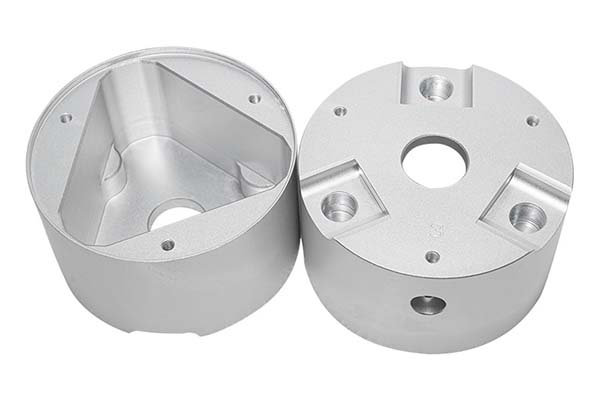
Medical device development is a high-stakes game. One wrong measurement, one weak material choice, or one overlooked design flaw can cost months of work and thousands of dollars. That’s why prototype models of PC medical devices have become essential tools for product engineers and procurement specialists in the medical industry.
Key takeaways
- The success of your PC medical device prototype starts with choosing the right materials.
- A precise design prevents 70% of prototyping problems. This phase translates your concept into a detailed plan that guides every subsequent step.
- Your precise design means nothing without the right instructions for CNC machines. This phase converts your 3D model into machine-readable code.
- Now your code meets the machine. This stage transforms raw PC material into a physical prototype through precise material removal.
1. Material Selection: Which Polymers Work Best for Medical Prototypes?
The success of your PC medical device prototype starts with choosing the right materials. Polycarbonate leads the way, but combining it with other polymers often delivers better results for specific medical applications.
Why Polycarbonate Dominates Medical Prototyping
PC offers three key benefits that make it irreplaceable for medical devices:
- Impact resistance: It absorbs shock without cracking—critical for handheld surgical tools that might drop during procedures
- Transparency: Doctors need to see fluid levels in diagnostic equipment, and PC’s clarity makes this possible
- Sterilization compatibility: PC withstands common medical sterilization methods like gamma radiation and ethylene oxide gas
Comparing PC with Partner Materials
| Material | Key Properties | Best Applications in Medical Devices |
|---|---|---|
| PC (Polycarbonate) | Tensile strength: 60 MPa, Transparency: 88%, Impact resistance: 25 kJ/m² | Ultrasound machine casings, surgical instrument handles, ventilator components |
| ABS | Easy machining, Low cost ($2-3/kg), Smooth surface finish | Internal frames for blood pressure monitors, non-structural brackets |
| PMMA (Acrylic) | Light transmittance: 92%, Scratch-resistant | Viewing windows for infant incubators, display covers |
| PU (Polyurethane) | Flexible, Biocompatible (ISO 10993 certified) | Cushion parts for patient monitors, grip enhancements |
Real Case: Solving Weight Issues with Material Blends
A European medical device company developed a portable oxygen concentrator prototype using pure PC. Initial tests showed promising strength, but nurses found the device too heavy to carry during hospital rounds. The solution came from blending PC with 15% ABS, which:
- Reduced total weight by 20%
- Maintained required impact resistance
- Cut material costs by 12%
- Kept the device durable for daily use
This case proves that material selection isn’t just about picking PC—it’s about finding the right combination for your specific use case.
Biocompatibility Considerations
Medical devices touch patients directly or indirectly. Your PC prototype materials must meet ISO 10993 standards for biocompatibility. This means:
- Testing for cytotoxicity (cell damage)
- Checking for skin irritation potential
- Ensuring no harmful chemicals leach out during use
For example, a dental curing light prototype requires PC that resists chemical cleaners used in clinics. Standard PC might degrade with repeated alcohol wiping, so medical-grade PC with chemical resistance is necessary.
2. Design Phase: How Do You Create a Flawless Blueprint?
A precise design prevents 70% of prototyping problems. This phase translates your concept into a detailed plan that guides every subsequent step.
Step 1: Build an Accurate 3D Model
Use professional CAD software like SolidWorks, Catia, or Creo to create your digital prototype. Your model must capture:
- External geometry: Every curve, button location, and display window
- Internal cavities: Spaces for circuit boards, batteries, and sensors
- Assembly interfaces: How parts snap together or get fastened
- Tolerances: Critical measurements with acceptable variation ranges
A mistake as small as 0.2mm in a PC syringe holder can make the prototype useless—the syringe might not fit securely or could fall out during use.
Step 2: Run Design Analysis Simulations
Before machining anything, test your design virtually. Finite element analysis (FEA) tools predict how your prototype will behave under real conditions:
- Stress points: Where will the prototype bend or break under pressure?
- Thermal effects: Will heat from internal components warp the PC?
- Flow dynamics: For fluid-handling devices, does liquid move correctly?
Real Case: A medical startup designed a surgical retractor prototype in PC. FEA analysis revealed a weak spot near the handle where the tool would bend under 50N of force—below the required 80N. They reinforced the area in the design, saving 3 weeks of rework that would have been needed if they’d machined the flawed version first.
Industry Data: Why Design Testing Matters
Research from medical device manufacturers shows:
- 65% of prototype failures trace back to untested designs
- 80% of successful projects run at least two design review cycles
- $15,000 average savings per project from catching design errors early
3. Programming Phase: What Code Makes CNC Machining Work?
Your precise design means nothing without the right instructions for CNC machines. This phase converts your 3D model into machine-readable code.
CAM Programming Basics
Computer-aided manufacturing (CAM) software like Mastercam or Fusion 360 translates your design into G-code—the language CNC machines understand. For a PC laboratory pipette prototype, the code specifies:
- Tool paths: Where the cutting bit moves
- Feed rates: How fast the tool cuts through PC
- Spindle speeds: Rotation speed for optimal cutting
- Surface finishes: Roughing passes vs. finishing passes
Testing Your Code Virtually
Never send untested code to a CNC machine. Simulation software checks for:
- Collisions: Will the tool hit clamps or the machine body?
- Tool breakage: Are cuts too aggressive for PC?
- Inefficient paths: Can the sequence be optimized for speed?
Real Case: A German medical company programmed a complex PC endoscope part with multiple internal channels. Virtual testing revealed a tool collision risk that would have destroyed the fixture and damaged the €3,000 PC workpiece. Fixing the code took 2 hours instead of 2 weeks for rebuilding.
Programming Time and Error Reduction
This phase typically takes 1-2 days for most PC medical prototypes. The investment pays off by:
- Reducing machining errors by 70%
- Cutting material waste by 50%
- Saving 3-5 days of troubleshooting during machining
4. Processing Stage: How Do You Shape PC Into Medical Parts?
Now your code meets the machine. This stage transforms raw PC material into a physical prototype through precise material removal.
Choosing the Right CNC Machine
Your part complexity determines the machine type:
| Machine Type | Best For | Time Savings |
|---|---|---|
| 3-axis CNC | Simple parts: PC test tube racks, basic handles | Baseline |
| 5-axis CNC | Complex parts: PC endoscope components, multi-angle surgical tools | 40% faster for complex geometries |
| Multi-tasking machines | Parts needing turning + milling: PC syringe components | 30% faster with one setup |
Real-Time Measurement During Machining
Quality control happens during cutting, not after. Coordinate measuring machines (CMMs) and in-process probes check dimensions as the machine works:
- For a PC glucose meter prototype, probes verify the display slot is exactly 50.0mm ±0.05mm
- If measurements drift, the machine automatically adjusts or stops
- This real-time feedback prevents making multiple bad parts
Real Case: 5-Axis Machining Success
A US medical device manufacturer needed a PC ventilator manifold prototype with complex internal air channels. Using 5-axis CNC machining:
- Completed in 5 days vs. 12 days with conventional methods
- Met all 24 dimensional requirements on first inspection
- Avoided 2 weeks of rework that would have been needed with 3-axis machining
- Saved $8,000 in repeat setup costs
Machining Parameters for PC
PC machines differently than metals or other plastics:
- Spindle speed: 15,000-20,000 RPM for clean cuts
- Feed rate: 0.1-0.2mm per tooth to prevent melting
- Cooling: Air blast or mist coolant—PC can crack with flood coolant temperature shock
- Tool material: Carbide tools with polished flutes to prevent material buildup
5. Post-Processing: What Finishes Make Prototypes Ready for Testing?
Raw machined PC parts need refinement before they resemble final medical devices. Post-processing adds functionality and aesthetics.
Deburring: Safety First
Machined PC edges often have microscopic burrs—raised plastic fragments that can:
- Injure users during handling
- Interfere with assembly
- Collect contaminants in sterile environments
Deburring steps:
- Initial pass: 300-grit sandpaper removes major burrs
- Fine smoothing: 500-grit paper creates polished edges
- Inspection: Magnification checks for remaining imperfections
A PC surgical scissors handle prototype had burrs along grip grooves that would have caused user discomfort. Twenty minutes of careful deburring solved the problem completely.
Surface Treatments for Specific Needs
| Treatment | Application | Example |
|---|---|---|
| Medical-grade painting | Sterile surfaces needing color coding | PC surgical tray with color-coded compartments |
| Silk screen printing | Adding labels and markings | “On/Off” text on PC defibrillator prototype |
| Electroplating | Conductive surfaces (rare for PC) | Grounding points on diagnostic device prototypes |
| Texturing | Improving grip | Non-slip patterns on PC instrument handles |
Optical Clarity Enhancement
For transparent PC prototypes like viewing windows or fluid chambers:
- Diamond polishing achieves optical-grade clarity
- Flame polishing quickly smooths edges (requires skill to prevent damage)
- Anti-reflective coatings improve visibility for display windows
6. Assembly Testing: Does Your Prototype Work as Designed?
A perfectly machined PC part fails if it doesn’t assemble correctly or function properly. This phase validates real-world performance.
Test Assembly Process
First, try putting everything together:
For a PC blood analyzer prototype:
- Do all panels align correctly?
- Do clips and fasteners engage securely?
- Are there interference points where parts rub?
- Can internal components (circuit boards, sensors) fit as designed?
Real Case: A Chinese medical company assembled their PC blood analyzer prototype and found a critical issue—a sensor bracket was loose. The PC mounting slot was 0.3mm too wide. Adjusting the design and machining a new bracket fixed the problem in 3 days instead of discovering it during final validation.
Functional Testing Scenarios
Simulate actual use conditions:
For a PC nebulizer prototype:
- Does it produce the correct mist particle size?
- Does the medicine reservoir seal properly?
- Can patients operate the controls easily?
For a PC hospital bed control panel:
- Do buttons register every press (test 10,000+ cycles)?
- Is the display readable in dim hospital lighting?
- Does the panel withstand disinfectant wiping?
Industry Benchmark: Testing Rounds
Data from medical device approvals shows:
- 80% of successful devices undergo 2+ functional testing rounds on prototypes
- 45% of prototypes reveal at least one major functional issue
- Average 3 design iterations before final production
7. Quality Control: How Do You Meet Medical Standards?
Medical devices face the strictest regulations of any industry. Your PC prototype quality system must match production-level rigor.
Multiple Checkpoint Strategy
Quality isn’t a final inspection—it’s built into every step:
| Checkpoint | What’s Verified | Action if Failed |
|---|---|---|
| Incoming material | PC batch certificate, ISO 10993 compliance | Return to supplier |
| Design output | 3D model accuracy, tolerance specifications | Redesign before machining |
| In-process machining | Critical dimensions, surface finish | Adjust tools or reprogram |
| Post-processing | Deburring quality, treatment uniformity | Rework immediately |
| Final assembly | Fit, function, appearance | Document and correct |
Certification Compliance
Your prototype process should follow ISO 13485—the medical device quality management standard. This ensures:
- Traceability: Every material batch and machining step is documented
- Corrective action: Problems get fixed permanently, not just patched
- Risk management: Potential failures are identified and prevented
For example, if a PC prototype part fails dimensional check, ISO 13485 requires investigating why, fixing the root cause, and verifying the solution—not just making another part.
Testing for Sterilization Compatibility
Medical devices must survive sterilization. Test your PC prototype with:
- Gamma radiation: Does PC yellow or become brittle?
- Ethylene oxide: Do seals remain intact?
- Autoclave (steam): Can PC withstand high-temperature cycles?
How to write a spec that gets priced correctly
A drawing is a contract. If it leaves a number open, the shop fills that number in with its own default. The default is rarely the one you had in mind. Put these five lines on every RFQ and most of the back-and-forth disappears before it starts.
- A model you are willing to freeze for the build
- The question the prototype must answer
- Process and material that can answer it
- Tolerance on the features under test
- How many iterations you have budgeted
The point is not paperwork. Each line removes a decision the shop would otherwise make for you. A complete RFQ comes back priced. An incomplete one comes back guessed.
What actually drives the price
Buyers usually push on material because it is the line they can see. In practice the material is rarely the biggest number on a quote. These five lines decide most of it:
- process choice
- part size and feature count
- material
- finish and fit checks
- number of iterations
Ask for the quote split by line. A supplier who cannot break it down is guessing, and you will pay for the guess. The line you can usually renegotiate is the tolerance band, not the raw material.
8. Cost and Timeline Factors: What Should You Expect?
Understanding typical costs and schedules helps you plan projects effectively.
Typical Timeline by Complexity
| Prototype Type | Complexity | Timeline | Cost Range |
|---|---|---|---|
| Simple PC part (test tube rack) | Low | 5-7 days | $500-1,500 |
| Moderate complexity (glucose meter housing) | Medium | 7-10 days | $2,000-4,000 |
| Complex assembly (ventilator manifold) | High | 10-14 days | $5,000-10,000 |
| Multi-part system (portable monitor) | Very high | 14-21 days | $10,000-25,000 |
Cost Drivers
- Material grade: Medical-grade PC costs 20-30% more than standard
- Complexity: Every additional feature increases machining time
- Tolerance requirements: Tight tolerances (±0.01mm) require slower machining
- Surface finish: Optical clarity requires extra polishing steps
- Testing requirements: Biocompatibility testing adds $500-2,000 per material
Creating prototype models of PC medical devices requires a systematic approach that balances precision, speed, and quality. Start with careful material selection—PC offers excellent strength and transparency, but blending with ABS or choosing medical-grade variants often delivers better results for specific applications. Your design phase deserves attention because 65% of failures trace back to untested designs. Virtual simulation catches these issues before machining begins.
Programming translates your design into machine instructions, and testing the code virtually prevents costly crashes. During machining, 5-axis CNC machines handle complex geometries 40% faster than conventional equipment while maintaining precision. Post-processing adds the finishing touches that make prototypes functional and presentable for testing.
Assembly and functional testing reveal real-world issues—80% of successful devices go through multiple testing rounds. Throughout every step, quality control following ISO 13485 standards ensures traceability and compliance with medical regulations.
The result? A PC medical device prototype that:
- Accurately represents your final product
- Withstands rigorous testing
- Meets biocompatibility requirements
- Provides confidence for regulatory submission
- Saves development time and cost
Whether you’re developing surgical instruments, diagnostic equipment, or patient monitoring devices, this step-by-step process guides you from concept to a tested, validated prototype ready for the next stage of medical device development.
Our solution for Create Prototype Models
YiguProto runs rapid prototyping in house, from a single prototype to a production batch. We quote the process, the material and the finish as separate lines, so you can see where the money goes instead of arguing with one number.
Send a STEP file or a drawing and you get a DFM report in one to two business days. It flags the features that add cost and the features that will not hold tolerance on the process you picked.
Every order ships with an inspection report on the features you call out. If a part misses, we make it again. Ready to price a part? Start with a free quote and DFM review, or read more about our rapid prototyping. You can also talk to an engineer before you commit to a drawing.
FAQ about Create Prototype Models
Can Create Prototype Models be made in small quantities?
Yes, and small quantities are where a good supplier earns the next order. Setup dominates the price at low volume, so the cheapest route is usually the one with the fewest operations, not the cheapest material.
Does the process work for prototypes as well as production?
Yes, and that is usually the point. Running the prototype on the production process removes a whole class of surprises, because the part you test is made the same way as the part you sell.
What tolerance can you hold on Create Prototype Models?
The working default is ±0.1 mm on most processes, tighter after machining. Tighter than that the process changes and so does the price, because every step tighter adds inspection time. Call out only the faces that mate with something else and leave the rest on the general tolerance.
What should I check before approving the parts?
Datums first, then the features that mate, then the cosmetic faces. Ask for a dimensional report, a material certificate and a finish sample. A part can be inside every tolerance and still not fit, so assemble one before you sign.
What is Create Prototype Models used for?
Create Prototype Models turns up wherever the part has to do a real job at a predictable cost: brackets, housings, fixtures, covers and the fittings that hold them together. The honest test is whether the properties match the load and the environment, not whether the material is fashionable.
Is there a minimum order quantity?
No hard minimum. One part is fine. What changes with volume is which costs dominate, so a single unit is priced mostly on setup and a thousand units are priced mostly on cycle time and material.
The short version
Create Prototype Models rewards the buyer who reads the data sheet and the drawing together. Pick the option for the property that matters, not for the price per kilo.
Tighten only what mates. Test a sample before the run. Then let the process do the rest.