
Rapid Prototyping
What Is the Complete Prototype Making Process? A Step-by-Step Guide
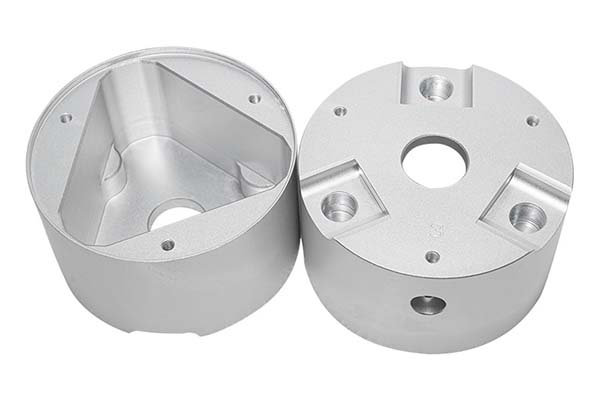
You have a product idea. You have sketches, notes, and maybe even a napkin drawing. Now comes the moment where your idea starts to become real: building a prototype. But where do you start? The prototype making process can feel overwhelming if you have never done it before. There are design decisions, material choices, manufacturing methods, and testing steps.
Key takeaways
- Every great prototype starts with a great digital design. This phase is where your idea becomes a structured, measurable plan.
- The material you choose affects everything—how your prototype looks, how strong it is, how it feels, and how much it costs.
- This is where your design becomes a real object you can hold. The method you choose depends on what you need to learn.
- A raw prototype is useful for testing, but a finished one is better for presentations and user feedback.
Step 1: Design Phase: Lay the Groundwork with Precise Digital Models
Every great prototype starts with a great digital design. This phase is where your idea becomes a structured, measurable plan. Rushing through it is the fastest way to cause problems later.
Industry data shows that rushing the design phase leads to 40% of prototype reworks. Take the time to get it right now, and you save days or weeks later.
What Tools Should You Use for 3D Modeling?
Your design needs to exist as a 3D digital model before anyone can make it. The software you choose matters.
| Software | Best For | Key Advantage |
|---|---|---|
| CAD (Computer-Aided Design) | 2D sketches and 3D models of mechanical parts | Industry standard for precision engineering |
| SolidWorks | Complex 3D designs with moving components | Handles assemblies and motion well |
| Fusion 360 | Startups and small teams | Combines modeling, simulation, and collaboration |
Data spotlight: About 85% of professional product developers use SolidWorks or CAD for 3D modeling. These tools reduce design errors by 35% compared to basic or free software.
If you are new to 3D modeling, Fusion 360 is a good starting point. It is powerful enough for most prototypes but easier to learn than traditional CAD tools.
What Should You Include in Your Model?
A complete 3D model includes:
- Exact dimensions for every feature
- Tolerances where parts need to fit together
- Wall thicknesses that are manufacturable (generally at least 0.8mm for plastic)
- Draft angles if the part might eventually be molded
- Assembly relationships if your product has multiple parts
Why You Need Design Reviews
Before sending your design to be made, gather feedback. Share your model with engineers, designers, and potential users. Ask specific questions:
- “Does this meet all technical requirements?”
- “Are there features that will be hard to manufacture?”
- “Will this be easy to test?”
Pro tip: Conduct 2 to 3 design reviews. Each review catches an average of 10 to 15 small flaws that would otherwise ruin your prototype.
Real-world example: A team designing a new electric toothbrush did a design review and realized the handle was 3mm too thick for an average adult hand. The CAD model looked fine, but the review caught the issue. They adjusted the design before making any prototypes, saving a week of wasted work.
Step 2: Material Selection: Choose the Right Material for Your Goals
The material you choose affects everything—how your prototype looks, how strong it is, how it feels, and how much it costs.
Common Prototype Materials Compared
| Material | Key Properties | Best For | Cost Per kg | Processing Difficulty |
|---|---|---|---|---|
| ABS | Strong, impact-resistant, easy to paint | Electronics prototypes, phone cases, housings | (2.50-)4.00 | Low (works with CNC and 3D printing) |
| PC (Polycarbonate) | Heat-resistant, transparent, shatterproof | Clear parts, lamp shades, safety goggles | (3.80-)5.50 | Medium (needs higher temps for 3D printing) |
| Nylon | Flexible, wear-resistant, chemical-resistant | Moving parts, gears, zippers | (4.20-)6.00 | Medium (absorbs moisture, needs pre-drying) |
| Aluminum | Lightweight, strong, corrosion-resistant | Metal prototypes, laptop frames, tool bodies | (2.00-)3.50 | Medium (CNC machining, needs finishing) |
How to Choose
Match your material to your prototype’s purpose:
- For visual approval only: ABS or basic resin. Cheap and easy to work with.
- For functional testing of moving parts: Nylon. It handles wear and flexing.
- For heat exposure: PC or aluminum. They won’t deform.
- For clarity: PC or acrylic. You need to see through it.
- For strength testing: Match the final production material as closely as possible.
Real-world example: A team prototyping a new wireless speaker chose ABS. It was affordable, easy to machine, and let them test the enclosure’s acoustic properties. If they had chosen a cheaper but weaker plastic, the prototype might have cracked during sound testing, giving false data.
Step 3: Processing Stage: Turn Digital Models into Physical Prototypes
This is where your design becomes a real object you can hold. The method you choose depends on what you need to learn.
Hand Making: Fast and Cheap for Early Concepts
Best for: Simple prototypes, foam models, early shape studies
Typical time: 1 to 2 days
Tolerance: ±1mm to ±3mm
Hand making uses basic tools—scissors, knives, sandpaper, glue—to shape materials by hand. It is fast and cheap but not precise.
Use hand making when you need a quick “proof of concept” to see if an idea has merit. Don’t use it for functional testing where accuracy matters.
CNC Machining: Precision for Functional Prototypes
Best for: High-precision parts, functional testing, metal prototypes
Typical time: 3 to 5 days
Tolerance: ±0.01mm or better
CNC machining uses computer-controlled tools to carve parts from solid blocks of material. It is the most popular method for functional prototypes because it produces parts that behave like final products.
Key benefits:
- Precision: Tolerances as tight as ±0.01mm—critical for parts that must fit together.
- Versatility: Works with all common materials—plastics, metals, wood.
- Speed: Faster than 3D printing for large parts.
Data note: CNC machining produces 60% of functional prototypes because it mimics production processes better than other methods.
Hand Grinding: Smoothing Rough Edges
After machining, parts often have small burrs or tool marks. Hand grinding removes these.
Use sandpaper from 180 grit (coarse) to 600 grit (fine). Start coarse to remove major imperfections, then move to fine for a smooth finish.
This step improves appearance and prevents scratches during testing.
Assembly: Putting It All Together
If your prototype has multiple parts, assembly is critical. Use the right joining method:
- Screws: For parts that need to be taken apart later.
- Adhesives: For permanent bonds.
- Snap fits: For parts that click together (like a battery cover).
Warning: Poor assembly causes 25% of prototype failures. Always test that parts fit properly before finalizing.
Step 4: Surface Treatment: Enhance Aesthetics and Functionality
A raw prototype is useful for testing, but a finished one is better for presentations and user feedback. Surface treatments make your prototype look and feel like a real product.
Common Surface Treatments
| Treatment | How It Works | Best For | Time |
|---|---|---|---|
| Grinding | Smoothing with sandpaper or machines | Matte finishes, better grip | 1-2 hours |
| Spraying | Applying paint with a spray gun | Color matching, brand identity | 2-3 hours plus drying |
| Electroplating | Adding a thin metal layer (chrome, nickel) | Metal appearance, corrosion resistance | 1-2 days |
| Anodizing | Creating protective oxide layer on aluminum | Durability, color, scratch resistance | 1 day |
| Silk Screen Printing | Transferring patterns or text | Labels, logos, control markings | 3-4 hours |
| Laser Engraving | Carving permanent designs | Serial numbers, unique identifiers | 1-2 hours |
Which Treatment Should You Choose?
- For user testing, combine spraying (for color) and silk screen printing (for labels). This makes the prototype feel like a real product, leading to more accurate feedback.
- For metal prototypes that will be handled, add anodizing or electroplating for durability.
- For clear parts, skip heavy treatments—the clarity is the feature.
Pro tip: Combining 2 to 3 treatments makes prototypes feel production-ready. A phone case prototype might be CNC machined, then painted, then silk-screened with the brand logo.
Step 5: Inspection and Testing: Validate Your Prototype
Before you declare success, you need to prove that your prototype actually meets your goals. Inspection checks dimensions. Testing checks function.
Quality Inspection
Compare your prototype against the original design specs:
- Size: Use calipers or a ruler. Does it match the CAD dimensions?
- Appearance: Are there scratches, uneven surfaces, or color mismatches?
- Material: Is it the material you specified? (Sometimes factories substitute.)
Standard: A good prototype should meet 95% of design specs. Small deviations (like 0.1mm in a non-critical area) are usually acceptable.
Functional Testing
Test how well the prototype performs its intended job:
- For a phone case: Drop it from 1.5 meters with a dummy phone inside. Does it protect?
- For a water bottle: Fill it and check for leaks. Does the lid seal?
- For a mechanical part: Cycle it 1,000 times. Does it wear or break?
Data point: 70% of prototypes fail their first functional test. This is normal and valuable. Each failure tells you what to improve.
Real-world example: A team testing a new folding chair prototype discovered that the locking mechanism failed after 50 cycles. They strengthened the design, made a new prototype, and it passed 1,000 cycles. Without that test, they would have launched a chair that broke after a few weeks of use.
Step 6: Packaging and Delivery: Protect and Transport
Once your prototype passes inspection and testing, it needs to reach its destination safely—whether that’s your office, a client, or a testing lab.
Packaging Steps
- Wrap the prototype: Use bubble wrap or foam. Pay extra attention to fragile parts.
- Choose the right box: Pick a rigid box that is 2 to 3 inches larger than the prototype on all sides.
- Fill empty space: Use packing peanuts or crumpled paper to prevent movement.
- Label clearly: Add “Fragile” and “Handle with Care” stickers. Include a packing slip with details.
Delivery Tips
- For local delivery: Use a courier with same-day or next-day service. Less time in transit means less risk of damage.
- For international delivery: Choose a service with tracking and insurance. International shipping takes 5 to 7 days, and insurance covers loss or damage.
How Long Does the Entire Process Take?
Timelines vary based on complexity and method.
| Prototype Type | Typical Timeline |
|---|---|
| Simple hand-made model (foam, cardboard) | 2 to 3 days |
| 3D printed plastic part | 3 to 7 days |
| CNC machined plastic part | 5 to 10 days |
| CNC machined metal part | 7 to 14 days |
| Complex assembly with multiple parts | 2 to 4 weeks |
Most prototypes fall into the 1 to 2 week range for functional parts.
How to write a spec that gets priced correctly
A drawing is a contract. If it leaves a number open, the shop fills that number in with its own default. The default is rarely the one you had in mind. Put these five lines on every RFQ and most of the back-and-forth disappears before it starts.
- A model you are willing to freeze for the build
- The question the prototype must answer
- Process and material that can answer it
- Tolerance on the features under test
- How many iterations you have budgeted
The point is not paperwork. Each line removes a decision the shop would otherwise make for you. A complete RFQ comes back priced. An incomplete one comes back guessed.
What actually drives the price
Buyers usually push on material because it is the line they can see. In practice the material is rarely the biggest number on a quote. These five lines decide most of it:
- process choice
- part size and feature count
- material
- finish and fit checks
- number of iterations
Ask for the quote split by line. A supplier who cannot break it down is guessing, and you will pay for the guess. The line you can usually renegotiate is the tolerance band, not the raw material.
Problems you will meet, and the fix
Every process has a failure mode it prefers. The same four show up again and again on this kind of work, and none of them are mysteries once you know what to look for.
- A prototype that is too good and hides a production problem
- A prototype that is too rough to test the real question
- Material chosen for speed rather than for the test
- No measurement plan, so the result is an opinion
Catch the fault on the first part, not the hundredth. A first-article check costs an hour. A bad batch costs the whole order. Write the check into the purchase order so nobody has to remember it.
What to check on the first article
The first article is the cheapest inspection you will ever buy. Use it properly and the rest of the run becomes boring, which is exactly what you want.
- Every dimension on the drawing, with the measured value written beside it.
- The material certificate, matched to the heat or lot number on the parts.
- The finish against the sample you approved, under the same light.
- Fit against the mating part, assembled rather than measured.
- Packaging, because parts that arrive damaged were never in tolerance.
Check in this order: datums, then mating features, then cosmetic faces. If the datums are wrong, every number after them is noise. Keep the report on file. When a problem shows up in month six, that document is the only thing that tells you what changed.
Common Mistakes to Avoid
Mistake 1: Skipping Design Review
Skipping review to save a day often causes weeks of rework. A design review takes hours. Fixing a bad prototype takes days or weeks.
Mistake 2: Choosing the Wrong Material
Material affects everything. Using a cheap plastic for a strength test gives you useless data. Match the material to your test goals.
Mistake 3: Ignoring Surface Treatment for User Tests
A rough, unfinished prototype leads to biased feedback. Users focus on the roughness instead of the actual design. A finished prototype yields more useful input.
Mistake 4: Not Testing Enough
One test is rarely enough. Test early, test often. Each test reveals something new.
Mistake 5: Moving to Production Too Soon
Prototypes exist to find flaws. If your first prototype works perfectly, you probably didn’t test it hard enough. Find the flaws now, when fixing them is cheap.
The prototype making process transforms ideas into physical objects you can test, refine, and improve. It follows a clear sequence:
- Design your product in 3D software, with complete details and multiple reviews.
- Select materials that match your test goals and final production intent.
- Process using hand methods, CNC machining, or 3D printing to create the physical part.
- Treat surfaces to improve appearance and function for testing.
- Inspect and test to validate that the prototype meets requirements.
- Package and deliver safely to its destination.
Each step builds on the last. Skipping or rushing any step increases risk and leads to wasted time and money.
But when you follow the process, prototypes become powerful tools. They reveal flaws while fixes are cheap. They generate feedback while changes are easy. They prove concepts before big investments.
A well-executed prototype is not the end of development. It is the beginning of real learning.
Our solution for Complete Prototype Making Process
YiguProto runs rapid prototyping in house, from a single prototype to a production batch. We quote the process, the material and the finish as separate lines, so you can see where the money goes instead of arguing with one number.
Send a STEP file or a drawing and you get a DFM report in one to two business days. It flags the features that add cost and the features that will not hold tolerance on the process you picked.
Every order ships with an inspection report on the features you call out. If a part misses, we make it again. Ready to price a part? Start with a free quote and DFM review, or read more about our rapid prototyping. You can also talk to an engineer before you commit to a drawing.
FAQ about Complete Prototype Making Process
What should I check before approving the parts?
Datums first, then the features that mate, then the cosmetic faces. Ask for a dimensional report, a material certificate and a finish sample. A part can be inside every tolerance and still not fit, so assemble one before you sign.
How much does Complete Prototype Making Process cost?
Price comes from five lines: material, machine or tool time, setup, finishing and inspection. The material itself is usually the smallest of them. Send a drawing and we will split the quote so you can see which line is doing the damage.
What happens if a part is out of specification?
We measure it against the same drawing you approved and, if it misses, we make it again. What matters is that the report exists, because a disagreement without data is just an opinion.
What is the lead time for Complete Prototype Making Process?
Expect 3 to 7 business days for a first article. Tooling, material stock and the finishing queue all move that number, so we confirm the date in writing before the run starts rather than after.
What material should I specify?
Specify by standard, not by trade name. A trade name can change under you between two orders; a standard number cannot. Then add the one property that actually decides the part, whether that is strength, heat resistance or chemical exposure.
Can Complete Prototype Making Process be made in small quantities?
Yes, and small quantities are where a good supplier earns the next order. Setup dominates the price at low volume, so the cheapest route is usually the one with the fewest operations, not the cheapest material.
The short version
Complete Prototype Making Process rewards the buyer who reads the data sheet and the drawing together. Pick the option for the property that matters, not for the price per kilo.
Tighten only what mates. Test a sample before the run. Then let the process do the rest.