
Rapid Prototyping
What Is Prototype Design and How to Master Its Key Stages?
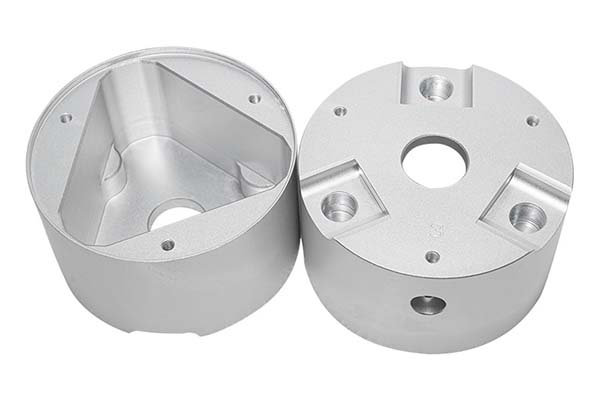
You have an idea for a new product. Maybe it’s a better phone case, a smarter lamp, or a more comfortable tool. But an idea on paper or a model on a screen isn’t enough. You need to hold it, test it, and see if it actually works. This is where prototype design comes in. It’s the process of turning your concept into a physical object you can touch and test.
Key takeaways
- Prototyping isn’t just about making a model. It solves specific problems in product development.
- Not all prototypes are the same. You choose the type based on what you need to learn.
- Prototype design is the essential bridge between an idea and a successful product. It’s a process of learning through building.
What Are the Core Purposes of Prototype Design?
Prototyping isn’t just about making a model. It solves specific problems in product development.
- Verify design feasibility: Can the part actually be made? Will the camera cutout on your phone case line up correctly? A prototype gives you a clear yes or no.
- Reduce development risks: Find weak spots before you spend thousands on a mold. For example, a prototype of a car interior handle might break during testing, showing you need a stronger material like ABS plastic instead of a cheaper one.
- Optimize user experience: Let real people hold and use it. If a smartwatch button is too hard to press, user feedback on a prototype tells you to make it bigger.
- Shorten development cycles: A 3D-printed part can be changed and reprinted in 24 hours. This lets you test ideas fast and get to market quicker.
- Save costs: Fixing a design on a prototype costs pennies. Fixing the same mistake on a production mold can cost thousands.
Real example: A startup spent $20,000 on a mold for a new toy. They skipped the prototype. The first batch of toys had a part that didn’t fit. They had to scrap the mold and start over. Another client made a 3D-printed prototype of a similar toy first. They found the fit issue, fixed the design for $50, and then made the mold. The prototype saved them $20,000.
What Are the Different Types of Prototype Design?
Not all prototypes are the same. You choose the type based on what you need to learn.
| Prototype Type | Primary Purpose | Common Examples | Key Requirements |
|---|---|---|---|
| Appearance Prototype | Check the shape, color, and surface texture. No working parts inside. | Phone cases, car body panels, the front of a home appliance. | Exact color match (like matching a Pantone color). Perfect surface finish. |
| Structural Prototype | Test how parts fit together and if the structure is strong. | Gears, brackets, the internal frame of an electronic device. | Accurate dimensions (errors less than ±0.1mm). Proper snap-fits and screw holes. |
| Functional Prototype | Verify that it actually works. Does the button press? Does the light turn on? | A smart lamp that turns on with a voice command, a medical tool, a toy with moving parts. | Working electronic circuits, reliable moving parts that can be tested many times. |
How to choose: Start with an appearance prototype (maybe a simple foam model of a new speaker) to see if the shape looks right. Once you like the look, make a structural prototype (like a 3D-printed speaker housing) to check if all the parts fit inside. Finally, build a functional prototype (add the circuit board and speakers) to test the sound quality.
What Is the Step-by-Step Process of Prototype Design?
Follow this clear path to move from an idea to a tested prototype.
Step 1: Demand Analysis: What Exactly Do You Need to Test?
Before you design anything, get very clear on your goal.
- Define your objectives: Ask one main question. For example, “Does the laptop hinge open a full 180 degrees?” or “Is this water bottle lid completely leak-proof?”
- Gather your information: Collect all your design drawings, 3D CAD models, and notes on required materials (like “must be heat-resistant”) and functions (like “button must work 10,000 times”).
Step 2: Design Planning: How Will You Build It?
Choose the right methods, materials, and finishes for your prototype type.
| Planning Category | Your Options |
|---|---|
| Production Process | CNC Machining: For high-precision metal or plastic parts. 3D Printing: Fast and good for complex shapes. Use FDM for PLA/ABS or SLA for high-detail resin. Handmade: Cheap for simple concept models using foam or clay. |
| Material Selection | PLA/ABS: Easy to print, low cost. Aluminum/Steel: Strong, for functional tests. Silicone: For soft, flexible parts like button covers. Acrylic: Clear, for parts that need to transmit light. |
| Surface Treatment | Spraying: To add color and texture. Electroplating: To add a shiny, metallic look. Silk Screen Printing: To add labels or text. |
Step 3: 3D Modeling: Create the Digital Blueprint
Use CAD software like SolidWorks or Fusion 360 to build an accurate digital model.
- Keep sizes exact: The digital model must match the real-world dimensions you want. A 10cm tall toy in the software must be 10cm tall when printed.
- Add assembly clearance: Leave a tiny gap, about 0.1-0.2mm, between parts that need to fit together, like a lid and a container. This prevents them from being too tight.
- Plan for printing: If your design has overhangs, like a curved lamp arm, you may need to add temporary support structures in the model so they print correctly.
Step 4: Prototype Fabrication: Bring It to Life
Turn your digital file into a physical object using your chosen method.
- For CNC machining: Your 3D model is used to create toolpaths (G-code) that guide the machine to cut the part from a solid block of material.
- For 3D printing: Your model is “sliced” into layers using software like Cura. You set the layer height (e.g., 0.1mm for detail) and send the file to the printer.
- For handmade: You physically carve or assemble the shape from materials like clay, wood, or foam board.
Step 5: Post-Processing and Assembly: Refine and Combine
The raw prototype needs work to look good and fit together.
- Sanding and polishing: Use sandpaper, from coarse 100-grit to fine 1500-grit, to smooth away layer lines from 3D printing or tool marks from CNC.
- Color coating: Spray paint the prototype to match your desired final color.
- Assembly testing: Put all the parts together. Does the circuit board fit inside the housing? Do the screws line up?
Step 6: Testing and Optimization: Validate and Improve
This is the most important step. Test your prototype and fix the problems.
| Test Type | What to Check | How to Fix Common Issues |
|---|---|---|
| Appearance Test | Does the shape and color match the design? | If the color is wrong, adjust your paint mix. If the surface is rough, sand it more. |
| Structural Test | Do parts fit together? Is it strong enough? | If parts are too tight, increase the assembly clearance in your 3D model by 0.1mm. If a part breaks, switch to a stronger material like ABS instead of PLA. |
| Functional Test | Do the buttons work? Does the circuit power on? | If a button doesn’t work, check its position relative to the switch inside. If a circuit fails, test each electronic component separately. |
How to write a spec that gets priced correctly
A drawing is a contract. If it leaves a number open, the shop fills that number in with its own default. The default is rarely the one you had in mind. Put these five lines on every RFQ and most of the back-and-forth disappears before it starts.
- A model you are willing to freeze for the build
- The question the prototype must answer
- Process and material that can answer it
- Tolerance on the features under test
- How many iterations you have budgeted
The point is not paperwork. Each line removes a decision the shop would otherwise make for you. A complete RFQ comes back priced. An incomplete one comes back guessed.
What actually drives the price
Buyers usually push on material because it is the line they can see. In practice the material is rarely the biggest number on a quote. These five lines decide most of it:
- process choice
- part size and feature count
- material
- finish and fit checks
- number of iterations
Ask for the quote split by line. A supplier who cannot break it down is guessing, and you will pay for the guess. The line you can usually renegotiate is the tolerance band, not the raw material.
Problems you will meet, and the fix
Every process has a failure mode it prefers. The same four show up again and again on this kind of work, and none of them are mysteries once you know what to look for.
- A prototype that is too good and hides a production problem
- A prototype that is too rough to test the real question
- Material chosen for speed rather than for the test
- No measurement plan, so the result is an opinion
Catch the fault on the first part, not the hundredth. A first-article check costs an hour. A bad batch costs the whole order. Write the check into the purchase order so nobody has to remember it.
What to check on the first article
The first article is the cheapest inspection you will ever buy. Use it properly and the rest of the run becomes boring, which is exactly what you want.
- Every dimension on the drawing, with the measured value written beside it.
- The material certificate, matched to the heat or lot number on the parts.
- The finish against the sample you approved, under the same light.
- Fit against the mating part, assembled rather than measured.
- Packaging, because parts that arrive damaged were never in tolerance.
Check in this order: datums, then mating features, then cosmetic faces. If the datums are wrong, every number after them is noise. Keep the report on file. When a problem shows up in month six, that document is the only thing that tells you what changed.
How to compare two quotes fairly
Two numbers are not comparable unless the scope matches. Line them up before you decide, because a low number with three gaps is not a low number.
Same drawing, same material, same finish, same inspection. Anything else is a different job wearing the same part number. Then look at what each quote leaves out. Freight, packaging, certificates and tooling are the usual gaps.
Ask each supplier to state their assumptions in writing. The one who does is usually the one who has run the process before.
Scaling from one part to a batch
The first part teaches you the process. The hundredth teaches you the process cost.
Watch three things as volume grows: setup amortisation, tool wear, and how much hand work the finish still needs. If the unit price barely moves between ten and a hundred, the cost sits in material or in hand work, not in setup. Ask which, because only one of them is negotiable.
Lead time behaves the same way. A one-off is scheduled around other jobs. A repeat order is scheduled around your forecast. Give the shop a forecast and the lead time gets shorter, not longer.
How to read a supplier's quote
A quote is a short document with a long shadow. Four things in it decide whether the job runs smoothly, and only one of them is the price.
- The scope line. It should name the process, the material and the finish, not just the part.
- The tolerance basis. General tolerance or the drawing, and which standard it follows.
- The exclusions. Tooling, freight, certificates and inspection are the usual omissions.
- The validity date. Material prices move, and an open-ended quote is a promise nobody can keep.
Read the exclusions before you read the total. A quote that leaves out tooling is not cheaper. It is a quote for a different job.
What to send with the first order
The first order sets the pattern for every order after it. Send a complete package once and the shop files it, and the second order takes a fraction of the time.
- A STEP or native model plus a PDF drawing carrying the same revision letter.
- The material callout by standard number, not by trade name.
- The finish and the exact faces it applies to.
- Any test the part must pass: fit, seal, drop, salt spray, dielectric.
- A contact who can answer a question inside one working day.
Then write down what was agreed. An email that confirms the material, the finish and the date is worth more than a longer purchase order that leaves them open.
What Are the Key Considerations for Prototype Design?
Keep these four things in mind to avoid common mistakes.
- Control your precision: For most parts, keep dimensional errors under ±0.1mm. For high-precision items like medical tools, aim for ±0.05mm. Use the right tools, like SLA printers or CNC machines, to achieve this.
- Balance cost and time: Use 3D printing for complex, one-off parts because it’s fast. Use simple, handmade methods for early concept models because they are cheap. For functional parts that need to be strong, CNC machining is worth the higher cost.
- Simulate function early: Test electronic components like LEDs or sensors separately before you build them into the final prototype. This saves troubleshooting time later.
- Know how to fix common problems: Warping: If your 3D print bends, check the print bed temperature and make sure it’s level. You might need to lower the nozzle temperature by 5-10°C. Delamination: If the layers of your print separate, your nozzle temperature might be too low. Increase it by 10-15°C or reduce the layer height. Functional failure: If a mechanism doesn’t work, test each component individually. You may need to add reinforcement ribs to weak parts.
Prototype design is the essential bridge between an idea and a successful product. It’s a process of learning through building. Start by defining what you need to test. Choose the right type of prototype—appearance, structural, or functional—based on your goal. Follow the six-step process: analyze your needs, plan your approach, create a 3D model, fabricate the part, refine it, and then test it rigorously. Use the results to make your design better. This cycle of building, testing, and improving is how you catch flaws early, save significant money, and create a product that users will love.
Our solution for Prototype Design
YiguProto runs rapid prototyping in house, from a single prototype to a production batch. We quote the process, the material and the finish as separate lines, so you can see where the money goes instead of arguing with one number.
Send a STEP file or a drawing and you get a DFM report in one to two business days. It flags the features that add cost and the features that will not hold tolerance on the process you picked.
Every order ships with an inspection report on the features you call out. If a part misses, we make it again. Ready to price a part? Start with a free quote and DFM review, or read more about our rapid prototyping. You can also talk to an engineer before you commit to a drawing.
FAQ about Prototype Design
What material should I specify?
Specify by standard, not by trade name. A trade name can change under you between two orders; a standard number cannot. Then add the one property that actually decides the part, whether that is strength, heat resistance or chemical exposure.
Can Prototype Design be made in small quantities?
Yes, and small quantities are where a good supplier earns the next order. Setup dominates the price at low volume, so the cheapest route is usually the one with the fewest operations, not the cheapest material.
How much does Prototype Design cost?
Price comes from five lines: material, machine or tool time, setup, finishing and inspection. The material itself is usually the smallest of them. Send a drawing and we will split the quote so you can see which line is doing the damage.
Is there a minimum order quantity?
No hard minimum. One part is fine. What changes with volume is which costs dominate, so a single unit is priced mostly on setup and a thousand units are priced mostly on cycle time and material.
How long does a first article take?
Usually a few business days once the drawing is frozen, and longer if tooling is involved. The date we give you is the date we confirm in writing, not the date we hope for.
What files do you need in order to quote?
A STEP file plus a PDF drawing that carries the same revision letter. The model carries the geometry and the drawing carries the intent. When the two disagree, the shop picks one, and it is never the one you meant.
The short version
Prototype Design rewards the buyer who reads the data sheet and the drawing together. Pick the option for the property that matters, not for the price per kilo.
Tighten only what mates. Test a sample before the run. Then let the process do the rest.