
Sheet Metal
How to Draw Technical Drawings: A Complete Guide for CNC Machining
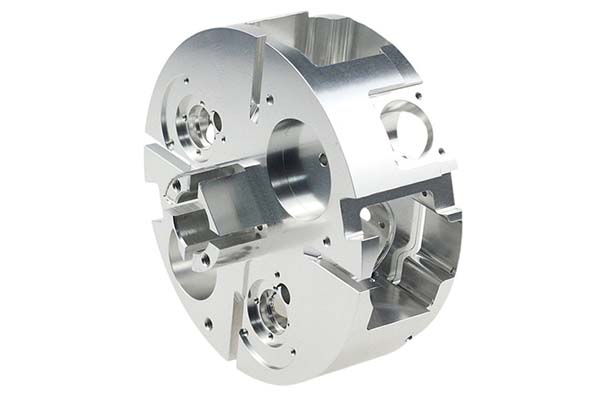
You have designed a part in 3D CAD. The model looks perfect on screen. Every feature appears exactly where it should. You send the file to a CNC shop and wait. Weeks later, the part arrives. It is wrong. Threads are too shallow. A hole is misplaced. The surface feels rough. What happened? The 3D model was not enough. CNC machining needs more than shapes—it needs instructions.
Why Can’t You Skip Technical Drawings for CNC Machining?
They Clarify Details That 3D Models Miss
3D CAD models show shape well. They struggle with manufacturing details. Technical drawings fill these gaps.
Threads are a common example. 3D models often show threads as simple cylinders or decorative spirals. Technical drawings specify thread size like M6x1.0, depth like 15mm, and type like coarse or fine. Machinists need these numbers to cut correctly.
Hidden features cause problems too. Internal holes and grooves are invisible in standard 3D views. Technical drawings use hidden lines to show exactly where these features are and how deep they go.
Tolerances beyond standards matter for precision parts. A gear might need ±0.02mm accuracy. Default ISO-2768 tolerances won’t cover this. Technical drawings spell out the exact requirements.
Real example: A startup sent a 3D model of a threaded bolt to a CNC shop. The model did not specify thread depth. The machinist made it 5mm deep—too short for the intended application. Fixing this cost $200 and delayed the project. A simple note on a technical drawing would have prevented the entire problem.
They Ensure Clear Communication With Machinists
Machinists do not just look at 3D models. They need specific instructions to work efficiently. Technical drawings provide a universal language that everyone understands.
Surface finish requirements go on drawings. Ra 1.6 μm means sanded smooth. Ra 0.8 μm means polished. Without this specification, you might get rough surfaces where you expected smooth ones.
Deburring requirements prevent sharp edges. A note like “all sharp edges to 0.5mm chamfer” tells the machinist to make parts safe to handle. Missing this note can result in edges that cut fingers or damage assemblies.
Assembly notes explain how parts fit together. “Align with hole A in part B” clarifies orientation that might not be obvious from the model alone.
Case study: A medical device company forgot to add “all sharp edges deburred” to their drawing. The first ten surgical tools arrived with sharp corners that risked patient injury. Rework cost $500 and delayed production by a week. Adding the note fixed the problem permanently.
They Speed Up Cost Estimation
CNC shops use technical drawings to create accurate quotes. Without drawings, they must guess or ask many questions.
Drawings let shops quickly identify:
Complex features like deep holes or tight tolerances that add machining time.
Surface treatments like anodizing or plating that increase costs.
Material specifications like 6061 aluminum versus stainless steel that affect pricing.
Data point: CNC shops receiving clear technical drawings provide quotes 30% faster. They have 40% fewer cost adjustments after production starts. Everyone benefits from this clarity.
What Does a Good Technical Drawing Include?
The Title Bar
The title bar identifies the part and project. It sits in the bottom-right corner of most drawing formats.
Key details to include:
- Part name and part number
- Designer name and date
- Company name
- Material specification like 6061 aluminum
- Scale like 1:1 for actual size
- Measurement system—metric or imperial
- Projection angle—first angle or third angle
The Front View
The front view shows the part’s main geometry. It is the foundation of your drawing.
Key details to include:
- Most dimensions like length, width, and height
- Visible features like holes and slots
- Hidden lines for internal features like blind holes
Center the front view on your drawing sheet. Leave 2 to 3 centimeters of space around it for dimensions and notes. Minimize hidden lines to avoid clutter—use them only for critical internal features.
The Isometric View
The isometric view provides a 3D-like perspective. It helps machinists visualize the part’s shape quickly.
This view is not mandatory but highly recommended. Place it in the top-right corner where it is easy to find but out of the way of dimensions. Complex parts with lattice structures or unusual shapes benefit most from isometric views.
The Sectional View
Sectional views reveal internal features. They show what the part looks like if cut in half.
Key details to include:
- A cut line on the front view showing where the slice happens
- Cross-hatching to mark cut areas
- Dimensions for internal holes and grooves
Draw a cut line labeled “A-A” on the front view. Place the sectional view nearby with the same label. This makes it clear which section corresponds to which cut.
The Detail View
Detail views zoom in on small or complex areas. They make tiny features readable.
Key details to include:
- A circle around the area on the front view
- A label like “Detail B” linking to the enlarged view
- The enlarged view drawn larger elsewhere on the sheet
Use detail views for features too small to dimension clearly in the main view. A 1mm micro-hole is a perfect candidate.
Dimensions and Tolerances
Dimensions tell the machinist how big the part should be. Tolerances tell them how much variation is acceptable.
Key details to include:
- Overall dimensions like length, width, and height
- Critical feature dimensions like hole diameters
- Tolerances like ±0.05mm for precision features
Manufacturer Notes
Manufacturer notes add extra instructions not covered elsewhere. They address quality and assembly requirements.
Key details to include:
- Deburring requirements
- Surface finish standards like Ra 3.2 μm
- Thread specifications like M8x1.25
- Assembly hints
| Component | Purpose | Key Details |
|---|---|---|
| Title Bar | Identifies part and project | Part name, material, scale, projection angle |
| Front View | Shows main geometry | Most dimensions, visible features, hidden lines |
| Isometric View | Provides 3D perspective | Helps visualize complex shapes |
| Sectional View | Reveals internal features | Cut line, cross-hatching, internal dimensions |
| Detail View | Zooms in on small areas | Enlarged view of tiny features |
| Dimensions | Specifies size | Overall and feature dimensions |
| Tolerances | Defines acceptable variation | Precision requirements like ±0.05mm |
| Notes | Adds extra instructions | Deburring, finish, threads, assembly |
How Do You Draw Technical Drawings Step by Step?
Step 1: Choose a Standard Template
Start with a template that follows industry standards like ASTM, DIN, or ISO. This ensures consistency and avoids confusion.
Good templates include:
- A pre-built title bar with placeholders for information
- Coordinate lines for referencing features
- Projection angle markers for first or third angle
Pro tip: If your CNC shop has a custom template, use it. Aligning with their workflow speeds up production.
Step 2: Add the Front View
The front view is your main reference. It shows the part’s most important features.
Center it on the sheet with space around for dimensions. Minimize hidden lines to avoid clutter. Include key features like holes, slots, threads, and chamfers that affect how the part works.
Example: For a simple bracket, the front view should show length of 100mm, width of 50mm, and an 8mm hole in the center.
Step 3: Add Sectional and Detail Views
Use these views to clarify complex areas.
For sectional views, draw a cut line on the front view labeled “A-A.” Place the sectional view nearby. Add cross-hatching to mark cut areas.
For detail views, circle the area on the front view labeled “Detail B.” Draw a larger version elsewhere on the sheet.
Case study: An engineer designing a valve used a sectional view to show an internal flow channel. The front view could not display this feature. The machinist said this view saved two hours of guesswork.
Step 4: Add an Isometric View
Isometric views are not required but add clarity for complex parts. They help machinists visualize 3D shape at a glance. They clarify installation orientation like which side faces up. They reduce questions from the shop, which means fewer emails and faster production.
Place the isometric view in the top-right corner. Keep it out of the way of dimensions but easy to find.
Step 5: Add Construction Lines
Construction lines guide dimensioning and ensure accuracy.
Centerlines mark the center of holes, shafts, or symmetrical features. Use dashed lines for these.
Cut lines show where sectional views are taken. Use thick solid lines with arrows.
Extension lines connect dimensions to features. Use thin solid lines and avoid overlapping with other lines.
Mistake to avoid: Skipping centerlines leads to misaligned holes and lopsided parts. Always include them.
Step 6: Dimension Your Drawing
Dimensions tell the machinist how big the part should be. This is the most critical step.
Follow these rules:
Start with overall dimensions like length, width, and height. For example, 120mm by 60mm by 10mm.
Add critical feature dimensions that affect fit. Hole diameters and thread sizes matter most.
Use a common baseline. Dimension from one edge consistently to avoid cumulative errors.
Label repeated features efficiently. For three identical 5mm holes, write “3 x ø5.0” instead of dimensioning each one.
| Dimension Type | Example | When to Use |
|---|---|---|
| Linear | 100mm | Length or width of flat parts |
| Radial | ø8mm | Hole diameter or shaft size |
| Thread | M6x1.0 | Internal or external threads |
| Depth | 15mm | Blind holes or grooves |
Warning: If you do not specify dimensions, the CNC shop will use their judgment. You cannot claim errors later if you left things unclear.
Step 7: Specify Tolerances for Key Features
Tolerances define acceptable variation. Use them only for features that need precision. Default ISO-2768 tolerances work for most non-critical parts.
Bilateral tolerance like ±0.03mm allows variation above and below the dimension.
Unilateral tolerance like +0.02/-0mm allows variation only in one direction.
GD&T or Geometric Dimensioning and Tolerancing handles complex requirements like parallelism of less than 0.01mm. Use this only if you understand GD&T standards.
Example: A gear fitting into a motor needs tolerance of ±0.02mm. A decorative bracket can use ±0.1mm. Specify accordingly.
Step 8: Fill in the Title Bar
Do not rush this step. Missing information here delays production.
Include:
- Part name like “CNC Bracket v2”
- Your name, date, and company
- Material like “Stainless Steel 304”
- Scale like “1:1” for most CNC parts to avoid scaling errors
- Projection angle like “Third Angle Projection” for North America or “First Angle” for Europe
Step 9: Add Manufacturer Notes
Notes spell out the small stuff that affects quality.
Write clearly and specifically:
Deburring: “All sharp edges to 0.5mm chamfer.”
Surface finish: “Ra 1.6 μm on all external surfaces.”
Threads: “M8x1.25 tap to 10mm depth, full thread.”
Assembly: “Align hole C with part D’s pin.”
Pro tip: Keep notes short and specific. Avoid vague phrases like “make it smooth” that leave room for interpretation.
Step 10: Export and Review
Export your drawing as PDF. This is the universal format for CNC shops. It avoids software compatibility issues.
Review with a machinist if possible. A quick check can catch errors you missed. Save a backup of the original CAD file, not just the PDF, in case you need to make changes later.
How to write a spec that gets priced correctly
A drawing is a contract. If it leaves a number open, the shop fills that number in with its own default. The default is rarely the one you had in mind. Put these five lines on every RFQ and most of the back-and-forth disappears before it starts.
- Flat pattern or STEP file plus a dimensioned drawing
- Material grade and thickness with the standard number
- Bend radii, K-factor and the direction of the grain
- Finish, masking and which faces stay bare
- Quantity and the assembly sequence
The point is not paperwork. Each line removes a decision the shop would otherwise make for you. A complete RFQ comes back priced. An incomplete one comes back guessed.
What actually drives the price
Buyers usually push on material because it is the line they can see. In practice the material is rarely the biggest number on a quote. These five lines decide most of it:
- blank size and nesting efficiency
- number of bends and weld joints
- material grade and thickness
- finish and masking
- batch quantity
Ask for the quote split by line. A supplier who cannot break it down is guessing, and you will pay for the guess. The line you can usually renegotiate is the tolerance band, not the raw material.
Problems you will meet, and the fix
Every process has a failure mode it prefers. The same four show up again and again on this kind of work, and none of them are mysteries once you know what to look for.
- Stretching at a bend that is tighter than the material allows
- Hole distortion when a hole sits too close to a bend line
- Weld draw on a visible face
- Springback that pulls a formed angle out of tolerance
Catch the fault on the first part, not the hundredth. A first-article check costs an hour. A bad batch costs the whole order. Write the check into the purchase order so nobody has to remember it.
What Common Mistakes Should You Avoid?
Overcomplicating the Drawing
Adding too many views clutters the drawing and confuses machinists. A detail view for a simple 5mm hole is unnecessary.
Stick to:
- One or two front views for simple parts
- One sectional view if there are internal features
- One isometric view for complex parts
Ignoring Tolerances
Assuming standard tolerances work for every part is risky. A part fitting into a tight space needs ±0.03mm. A mounting bracket can use ±0.1mm. Always specify tolerances for critical features.
Poor Dimension Placement
Dimensions that overlap, cross lines, or are too small cause mistakes. Place dimensions outside the part view, not on top of it. Use font size of at least 2.5mm so machinists can read easily. Avoid dimension stacking—do not put three dimensions in a tight row. Space them out.
Technical drawings are essential for CNC machining success. They communicate what 3D models cannot—thread specifications, tolerances, surface finishes, and hidden features.
A complete drawing includes seven core components. The title bar identifies the part. Views show geometry from different angles. Dimensions specify size. Tolerances define acceptable variation. Notes add extra instructions.
Drawing them requires ten steps. Choose a template. Add views progressively. Include construction lines. Dimension carefully. Specify tolerances where needed. Fill in the title bar. Add clear notes. Export and review.
Common mistakes to avoid include overcomplicating views, ignoring tolerances, and placing dimensions poorly. Good drawings avoid these pitfalls.
With practice, creating effective technical drawings becomes routine. The time invested pays back in fewer errors, faster quotes, and parts that match your design exactly.
Our solution for Draw Technical Drawings
YiguProto runs sheet metal fabrication in house, from a single prototype to a production batch. We quote the process, the material and the finish as separate lines, so you can see where the money goes instead of arguing with one number.
Send a STEP file or a drawing and you get a DFM report in one to two business days. It flags the features that add cost and the features that will not hold tolerance on the process you picked.
Every order ships with an inspection report on the features you call out. If a part misses, we make it again. Ready to price a part? Start with a free quote and DFM review, or read more about our sheet metal fabrication. You can also talk to an engineer before you commit to a drawing.
FAQ about Draw Technical Drawings
What should I check before approving the parts?
Datums first, then the features that mate, then the cosmetic faces. Ask for a dimensional report, a material certificate and a finish sample. A part can be inside every tolerance and still not fit, so assemble one before you sign.
What material should I specify?
Specify by standard, not by trade name. A trade name can change under you between two orders; a standard number cannot. Then add the one property that actually decides the part, whether that is strength, heat resistance or chemical exposure.
How much does Draw Technical Drawings cost?
Price comes from five lines: material, machine or tool time, setup, finishing and inspection. The material itself is usually the smallest of them. Send a drawing and we will split the quote so you can see which line is doing the damage.
How do I compare two quotes fairly?
Match the scope first: same drawing, same material, same finish, same inspection. Then read the exclusions. Freight, tooling and certificates are the usual gaps, and a low number with three gaps is not a low number.
What files do you need in order to quote?
A STEP file plus a PDF drawing that carries the same revision letter. The model carries the geometry and the drawing carries the intent. When the two disagree, the shop picks one, and it is never the one you meant.
What happens if a part is out of specification?
We measure it against the same drawing you approved and, if it misses, we make it again. What matters is that the report exists, because a disagreement without data is just an opinion.
The short version
Draw Technical Drawings rewards the buyer who reads the data sheet and the drawing together. Pick the option for the property that matters, not for the price per kilo.
Tighten only what mates. Test a sample before the run. Then let the process do the rest.