
Blogs
PC 3D Printing Services

Elevate your manufacturing game with PC 3D Printing—the perfect fusion of durable Polycarbonate and advanced additive manufacturing technologies. From high-strength automotive components to intricate consumer electronics parts, our shop deliver custom solutions that blend complex geometries, rapid turnaround, and cost-effectiveness.
Key takeaways
- At our shop, we’ve honed a suite of capabilities to meet the diverse needs of industries ranging from aerospace to consumer goods.
- PC 3D Printing leverages Polycarbonate (a robust, heat-resistant thermoplastic) and 3D Printing technologies to build parts layer by layer—a core principle of additive manufacturing.
- Our PC 3D Printing process is a structured, quality-focused workflow that ensures consistency and reliability:
- Polycarbonate (PC) is a versatile thermoplastic, but we offer specialized variants to match your application’s demands.

Our Capabilities: Bringing Your Visions to Life
At our shop, we’ve honed a suite of capabilities to meet the diverse needs of industries ranging from aerospace to consumer goods. Our expertise covers every stage of the PC 3D Printing journey:
- Custom 3D Printing: We tailor parts to your exact specs, whether you need unique complex geometries for robotics or lightweight structures for sports equipment.
- Precision Manufacturing: Our machines deliver high-resolution printing (down to 50μm layer thickness) and tight tolerances, ensuring parts fit seamlessly into your systems.
- Large-Format Printing: We handle PC parts up to 1000mm × 800mm × 500mm—ideal for architectural models or industrial equipment enclosures.
- Rapid Prototyping: Cut lead times from 4–6 weeks to 3–5 days, letting you test and refine designs faster than ever.
- Post-Processing Services: From sanding to coating, we refine parts to meet your aesthetic and functional needs (e.g., UV curing for enhanced durability).
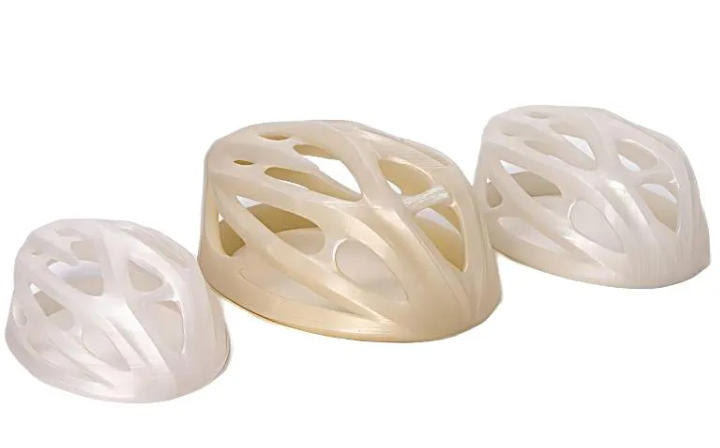
Table: Our Capabilities vs. Industry Benchmarks
| Capability | our shop Performance | Industry Average |
| Max Print Size | 1000×800×500mm | 600×600×600mm |
| Prototyping Lead Time | 3–5 days | 7–10 days |
| Print Resolution | 50–100μm | 100–200μm |
| Multi-Material Support | Up to 3 materials (e.g., PC + carbon fiber) | 1–2 materials |
What Is PC 3D Printing?
PC 3D Printing leverages Polycarbonate (a robust, heat-resistant thermoplastic) and 3D Printing technologies to build parts layer by layer—a core principle of additive manufacturing. Unlike traditional subtractive methods, this approach uses techniques like Fused Deposition Modeling (FDM), Stereolithography (SLA), and Selective Laser Sintering (SLS) to create objects from digital designs, enabling flexibility that’s hard to match.
Key technologies powering PC 3D Printing:
| Technology | Core Mechanism | Ideal PC Applications |
| Fused Deposition Modeling (FDM) | Thermoplastic Extrusion of PC filament | Large-format parts (e.g., automotive housings) |
| Stereolithography (SLA) | Photopolymerization of PC-blend resins | High-detail prototypes (e.g., consumer electronics components) |
| Selective Laser Sintering (SLS) | Sintering of PC powder | Durable end-use parts (e.g., industrial gears) |
At its heart, PC 3D Printing enables digital prototyping and layer-by-layer fabrication, turning abstract ideas into tangible, functional parts in days—not weeks.
Process: From Design to Finished PC Part
Our PC 3D Printing process is a structured, quality-focused workflow that ensures consistency and reliability:
- Design Phase: Collaborate with our team to finalize your CAD model, optimizing it for PC’s properties (e.g., accounting for minimal warping).
- CAD Modeling & STL Conversion: We convert your design into an STL file—compatible with all major slicing software (e.g., Cura, Simplify3D).
- Print Preparation: The slicer breaks the model into layers (0.05–0.3mm) and sets parameters (e.g., temperature for PC extrusion: 250–300°C).
- Layer Deposition: Using FDM (most common for PC), the printer extrudes molten PC filament layer by layer, or for resins, SLA uses UV light for curing process.
- Support Structure Removal: For overhanging parts, we carefully remove soluble or breakaway supports without damaging the PC part.
- Post-Curing (if applicable): SLA-printed PC parts undergo UV post-curing to boost strength and stability.
Quality Control: Every part is inspected with laser scanners to check dimensional accuracy and ensure it meets your specs.
Materials: Choosing the Right PC for Your Project
Polycarbonate (PC) is a versatile thermoplastic, but we offer specialized variants to match your application’s demands. Here’s how our materials stack up:
| Material Type | Key Properties | Ideal Applications |
| Standard PC Filament | High impact resistance (65kJ/m²), heat resistance (120°C HDT) | Consumer electronics housings, toys |
| Carbon Fiber Reinforced PC | 30% higher strength than standard PC, low weight | Aerospace brackets, robotics parts |
| Glass Fiber Reinforced PC | Improved stiffness, chemical resistance | Automotive underhood components |
| PC-ABS Blend | Balanced impact strength and flexibility | Industrial equipment enclosures |
| PC Photopolymer Resin | High detail (50μm layer), smooth surface | Medical device prototypes, jewelry |
We also work with complementary materials like ABS, PLA, and nylon for multi-material projects—perfect for parts that need a mix of rigidity (PC) and flexibility (TPU).
Advantages: Why PC 3D Printing Beats Traditional Methods
PC 3D Printing offers a range of benefits that make it a top choice for modern manufacturing:
- Customization: Create one-of-a-kind parts (e.g., patient-specific medical device prototypes) without expensive molds.
- Rapid Prototyping: Test designs in days, cutting product development time by 50% compared to injection molding.
- Cost-Effective: For small batches (1–100 parts), PC 3D Printing costs 30–40% less than traditional machining.
- Reduced Waste: Additive manufacturing uses only the material needed, slashing waste to <5% (vs. 20–30% for machining).
- Complex Geometries: Print internal channels, overhangs, and lattice structures that are impossible with CNC machining.
- High Strength & Durability: PC parts have 2x the impact resistance of ABS, making them ideal for end-use parts (e.g., robotics components).
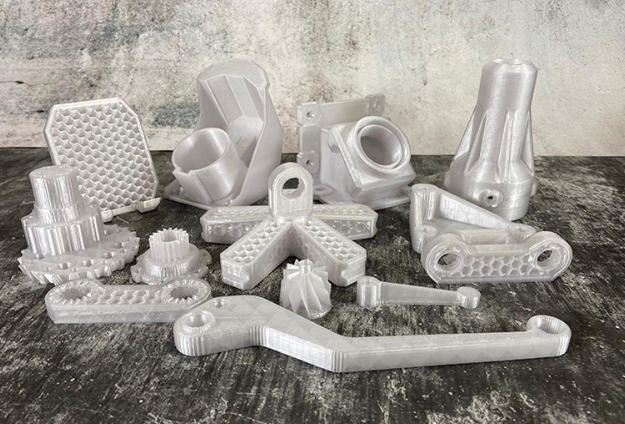
Table: PC 3D Printing vs. Traditional Manufacturing (for 50 PC Parts)
| Factor | PC 3D Printing (FDM) | Injection Molding | CNC Machining |
| Lead Time | 5 days | 4 weeks | 2 weeks |
| Cost | $1,500 | $5,000 (includes mold) | $3,000 |
| Waste | <5% | 10–15% | 25–30% |
| Design Flexibility | High (complex geometries) | Low (fixed mold) | Medium (limited by tooling) |
Applications Industry: Where PC 3D Printing Excels
PC’s strength, heat resistance, and versatility make it a staple across industries. Here’s how we’re using PC 3D Printing to solve real-world problems:
| Industry | Key Applications | Why PC? |
| Aerospace | Interior brackets, cable management parts | High strength-to-weight ratio, heat resistance |
| Automotive | Sensor housings, dashboard prototypes | Impact resistance, chemical resistance to oils |
| Consumer Electronics | Phone cases, laptop stands | Durability, sleek aesthetic potential |
| Medical Devices | Surgical tool handles, diagnostic equipment enclosures | Biocompatibility (medical-grade PC), easy sterilization |
| Robotics | Gear housings, structural frames | High rigidity, impact resistance |
| Sports Equipment | Helmet liners, bike components | Lightweight, shock absorption |
How to write a spec that gets priced correctly
A drawing is a contract. If it leaves a number open, the shop fills that number in with its own default. The default is rarely the one you had in mind. Put these five lines on every RFQ and most of the back-and-forth disappears before it starts.
- A model and a drawing that agree
- Material by standard number
- Tolerance only where it mates
- Finish and the faces it applies to
- Quantity and required date
The point is not paperwork. Each line removes a decision the shop would otherwise make for you. A complete RFQ comes back priced. An incomplete one comes back guessed.
What actually drives the price
Buyers usually push on material because it is the line they can see. In practice the material is rarely the biggest number on a quote. These five lines decide most of it:
- process choice
- material
- tolerance band
- finish
- volume
Ask for the quote split by line. A supplier who cannot break it down is guessing, and you will pay for the guess. The line you can usually renegotiate is the tolerance band, not the raw material.
Problems you will meet, and the fix
Every process has a failure mode it prefers. The same four show up again and again on this kind of work, and none of them are mysteries once you know what to look for.
- A drawing that contradicts the model
- A tolerance with no datum
- A cosmetic callout with no approved sample
- A quote compared against a different scope
Catch the fault on the first part, not the hundredth. A first-article check costs an hour. A bad batch costs the whole order. Write the check into the purchase order so nobody has to remember it.
What to check on the first article
The first article is the cheapest inspection you will ever buy. Use it properly and the rest of the run becomes boring, which is exactly what you want.
- Every dimension on the drawing, with the measured value written beside it.
- The material certificate, matched to the heat or lot number on the parts.
- The finish against the sample you approved, under the same light.
- Fit against the mating part, assembled rather than measured.
- Packaging, because parts that arrive damaged were never in tolerance.
Check in this order: datums, then mating features, then cosmetic faces. If the datums are wrong, every number after them is noise. Keep the report on file. When a problem shows up in month six, that document is the only thing that tells you what changed.
How to compare two quotes fairly
Two numbers are not comparable unless the scope matches. Line them up before you decide, because a low number with three gaps is not a low number.
Same drawing, same material, same finish, same inspection. Anything else is a different job wearing the same part number. Then look at what each quote leaves out. Freight, packaging, certificates and tooling are the usual gaps.
Ask each supplier to state their assumptions in writing. The one who does is usually the one who has run the process before.
Scaling from one part to a batch
The first part teaches you the process. The hundredth teaches you the process cost.
Watch three things as volume grows: setup amortisation, tool wear, and how much hand work the finish still needs. If the unit price barely moves between ten and a hundred, the cost sits in material or in hand work, not in setup. Ask which, because only one of them is negotiable.
Lead time behaves the same way. A one-off is scheduled around other jobs. A repeat order is scheduled around your forecast. Give the shop a forecast and the lead time gets shorter, not longer.
How to read a supplier's quote
A quote is a short document with a long shadow. Four things in it decide whether the job runs smoothly, and only one of them is the price.
- The scope line. It should name the process, the material and the finish, not just the part.
- The tolerance basis. General tolerance or the drawing, and which standard it follows.
- The exclusions. Tooling, freight, certificates and inspection are the usual omissions.
- The validity date. Material prices move, and an open-ended quote is a promise nobody can keep.
Read the exclusions before you read the total. A quote that leaves out tooling is not cheaper. It is a quote for a different job.
What to send with the first order
The first order sets the pattern for every order after it. Send a complete package once and the shop files it, and the second order takes a fraction of the time.
- A STEP or native model plus a PDF drawing carrying the same revision letter.
- The material callout by standard number, not by trade name.
- The finish and the exact faces it applies to.
- Any test the part must pass: fit, seal, drop, salt spray, dielectric.
- A contact who can answer a question inside one working day.
Then write down what was agreed. An email that confirms the material, the finish and the date is worth more than a longer purchase order that leaves them open.
When this is the wrong choice
A good supplier tells you when the process does not fit. These are the cases where we say so.
- The volume is so low that setup costs more than the parts are worth.
- The tolerance is tighter than the process can hold without a second operation.
- The geometry cannot be made without a tool feature that will not pay back.
- The material you need is not available in the form the process requires.
- The schedule is shorter than the tooling or setup time, and nobody has said so yet.
None of these are refusals. They are reasons to look at a different route, and the earlier that conversation happens the cheaper it is. The most expensive mistake in manufacturing is a process chosen before the question was understood.
Planning the ramp from prototype to production
The gap between one good part and a thousand identical ones is a plan, not a machine. Three decisions close it.
First, freeze the design. Every change after tooling starts is a re-cut, and re-cuts are where schedules go. Second, decide the inspection level. A prototype is checked by eye; a production part is checked against a report. Third, agree the change process in writing, including who pays for it.
Write the ramp down as dates and owners, not as intentions. A ramp plan with three names and three dates is worth more than a page of good intentions.
What documentation to expect
Paperwork is not bureaucracy when a part fails at the customer. It is the only record of what was agreed. A normal shipment should carry four documents.
- A dimensional report covering every callout on the drawing.
- A material certificate traceable to the heat or lot number.
- A finish or coating certificate where the specification requires one.
- A packing list that matches the carton labels.
If a supplier cannot produce these on request, they are not running a controlled process. Ask for one sample set before you place the first order and you will know exactly what you are buying.
Case Studies: PC 3D Printing in Action
Our PC 3D Printing solutions have helped clients overcome manufacturing challenges and achieve their goals:
Case Study 1: Automotive Sensor Housing
- Client: A global automotive supplier.
- Challenge: Need a heat-resistant, impact-proof housing for engine sensors (traditional ABS parts failed in high temperatures).
- Solution: FDM-printed PC housing with a glass fiber reinforcement (for extra stiffness) and epoxy coating (for chemical resistance).
- Results: 0% failure rate in 6 months of testing (vs. 15% for ABS), 20% cost savings vs. injection molding, and 2-week lead time (vs. 4 weeks).
Case Study 2: Medical Diagnostic Equipment Enclosure
- Client: A medical device startup.
- Challenge: Develop a lightweight, sterilizable enclosure for a portable ultrasound machine (needed to fit tight dimensions).
- Solution: SLA-printed medical-grade PC resin enclosure with a polished finish (for easy cleaning) and UV-curing (for durability).
- Results: Met FDA biocompatibility standards, 30% lighter than aluminum enclosures, and 50% faster prototyping than machining.
Case Study 3: Robotics Gear Housing
- Client: A robotics company.
- Challenge: Create a gear housing that can withstand high torque and impact (CNC-machined aluminum was too heavy).
- Solution: SLS-printed carbon fiber reinforced PC housing—optimized for complex geometries to reduce weight.
Results: 40% weight reduction, 15% higher torque resistance than aluminum, and $1,200 cost savings for 50 units.
Our solution for PC 3D Printing Services
YiguProto runs custom manufacturing in house, from a single prototype to a production batch. We quote the process, the material and the finish as separate lines, so you can see where the money goes instead of arguing with one number.
Send a STEP file or a drawing and you get a DFM report in one to two business days. It flags the features that add cost and the features that will not hold tolerance on the process you picked.
Every order ships with an inspection report on the features you call out. If a part misses, we make it again. Ready to price a part? Start with a free quote and DFM review, or read more about our custom manufacturing. You can also talk to an engineer before you commit to a drawing.
FAQ about PC 3D Printing Services
Can PC 3D printed parts be used as end-use components, or are they only for prototyping?
Absolutely—PC’s high strength and durability make it ideal for end-use parts. We’ve supplied PC end-use components like automotive sensor housings, robotics gear frames, and medical device enclosures. For high-volume end-use parts (1,000+ units), we combine FDM/SLS with multi-jet fusion to keep costs low.
What is the maximum temperature a PC 3D printed part can withstand?
Standard PC parts can handle continuous use up to 120°C (248°F) and short bursts up to 140°C (284°F). For higher-temperature applications (e.g., aerospace underhood parts), we offer heat-resistant PC blends (reinforced with glass or carbon fiber) that can withstand up to 160°C (320°F). All our PC materials are tested for thermal stability to ensure consistent performance.
How do you ensure the quality of PC 3D printed parts for critical applications (e.g., medical devices)?
We follow a strict quality control process: (1) Using only certified materials (e.g., medical-grade PC resin meeting ISO 10993); (2) 100% dimensional inspection with CMMs (Coordinate Measuring Machines) to check dimensional accuracy; (3) Mechanical testing (impact, tensile strength) for every batch; (4) For medical parts, third-party sterilization and biocompatibility testing. We also provide full traceability reports for critical projects.
What is the lead time for PC 3D Printing Services?
Expect 5 to 15 business days depending on process. Tooling, material stock and the finishing queue all move that number, so we confirm the date in writing before the run starts rather than after.
How much does PC 3D Printing Services cost?
Price comes from five lines: material, machine or tool time, setup, finishing and inspection. The material itself is usually the smallest of them. Send a drawing and we will split the quote so you can see which line is doing the damage.
What happens if a part is out of specification?
We measure it against the same drawing you approved and, if it misses, we make it again. What matters is that the report exists, because a disagreement without data is just an opinion.
The short version
PC 3D Printing Services rewards the buyer who reads the data sheet and the drawing together. Pick the option for the property that matters, not for the price per kilo.
Tighten only what mates. Test a sample before the run. Then let the process do the rest.