
Rapid Prototyping
Why Are Plastic Communication Equipment Prototype Models Essential for Reliable Product Development?
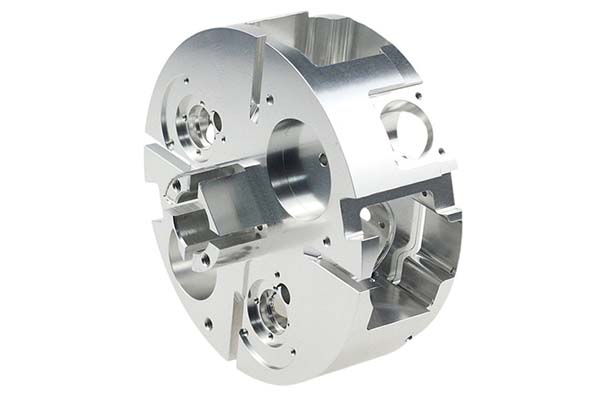
In the fast-evolving communication industry, verifying design feasibility and functionality before mass production isn’t just smart—it’s critical to reducing costs and meeting strict performance standards. The plastic communication equipment prototype model is a true game-changer here.
Why Are Plastic Materials Perfect for Communication Equipment Prototypes?
Balancing Durability, Signal Compatibility, and Cost
Communication equipment faces unique challenges. Outdoor base stations must survive rain, sun, and temperature swings. Indoor routers need to look good while protecting sensitive electronics. All of it must work without interfering with the signals that are the whole point of the device.
Plastics deliver on all these requirements. They resist environmental damage like humidity and UV exposure, they don’t interfere with radio signals, and they’re easy to shape into complex designs like curved router bodies or intricately vented enclosures.
A leading 5G equipment manufacturer recently proved this with base station component housings. They created PC plastic prototypes and exposed them to 110°C heat (simulating hot rooftop conditions) for 800 hours. They also ran 50+ rainstorm simulations. The prototypes showed no deformation and no water leakage. This early testing saved the company an estimated $170,000 in potential rework costs for mass-produced housings that would have failed in the field.
Common Plastics and Their Communication Applications
| Material | Key Properties | Communication Use Case Examples | Temperature Range | Signal Interference Risk |
|---|---|---|---|---|
| ABS | Easy to process, good impact resistance, low cost | Router shells, network switch housings, indoor device enclosures | -20°C to 80°C | Low |
| PC | High-temperature resistance, strong impact resistance, excellent dimensional stability | 5G base station housings, fiber optic equipment casings, outdoor components | -40°C to 120°C | Very Low |
| PMMA | High transparency (92%), good weather resistance | Transparent covers for signal indicators, outdoor router windows, display lenses | -30°C to 70°C | Low |
| PP | Excellent chemical resistance, lightweight, low moisture absorption | Outdoor device bases, cable management parts, weather-resistant enclosures | -30°C to 100°C | Low |
| Nylon | High strength, wear resistance, good heat resistance | Internal structural supports for communication towers, load-bearing brackets | -40°C to 130°C | Low |
| POM | Excellent mechanical properties, dimensional stability | Precision gears for adjustable antenna components, moving parts | -40°C to 100°C | Low |
What Factors Should Guide Your Material Selection?
Match Plastics to Your Specific Communication Needs
Choosing the right material is absolutely make-or-break for communication prototypes. Focus on these critical factors:
Working environment: For outdoor devices like base stations and antennas, pick weather-resistant plastics like PP or PC. For indoor use like routers and switches, cost-effective ABS works well while keeping project budgets under control.
Performance requirements: Need signal compatibility? All plastics listed above have low signal interference—one reason they’re preferred over metals for communication applications. Need strength for structural parts supporting heavy equipment? Choose nylon or POM for their superior mechanical properties.
Processing ease: For complex designs like curved antenna housings with internal features, choose easy-to-machine ABS or PC to reduce production time and avoid machining difficulties.
Real-world lesson: A small telecom startup once chose PMMA instead of PC for an outdoor router cover, thinking the transparency would look nice. After just 3 months of UV exposure, the PMMA cracked and yellowed. They had to restart with PC, losing 6 weeks and significant budget. Always match materials to the device’s actual environment, not just appearance.
How Do You Ensure Design Accuracy Before Machining?
Data Collection Sets the Foundation
This step lays the groundwork for a prototype that matches your exact design specifications. Rushing through it guarantees problems later.
3D drawing import: Always request complete 3D CAD files from your design team in formats like STEP or IGES. These files are your blueprint. Import them into software like AutoCAD for data verification and machining programming.
A network switch manufacturer once provided incomplete CAD files missing critical hole positions for cable connections. The resulting prototype looked right but couldn’t actually connect wires—wasting $3,500 and 2 weeks of development time. Double-checking files upfront would have caught this immediately.
Gypsum sample production: Create a low-cost gypsum sample to confirm shape, curvature, and size before any plastic is cut. This is essentially a “test run” for your design’s accuracy—critical for parts like antenna housings that need precise dimensions.
A fiber optic company uses gypsum samples to verify every PC prototype cover curve, maintaining a 0.1mm margin of error for tight dust seals. If the gypsum sample shows issues, fixing the CAD file costs nothing compared to machining expensive plastic.
How Does CNC Machining Create Precision Communication Prototypes?
Achieving the Accuracy Communication Equipment Demands
CNC machining turns raw plastic into finished prototypes with the precision communication equipment requires. Modern machines achieve surface finishes as smooth as Ra 1.6μm—perfect for parts that need tight fits like router shell joints and sealed enclosures.
Programming and setting: Use software like Mastercam to create precise cutting paths. The CNC machine follows these paths, removing excess plastic to leave your exact part shape. Proper programming ensures that cable holes in switch prototypes are perfectly aligned, avoiding signal loss from misfit connectors or poorly seated cables.
Multi-axis advantages: For complex parts like adjustable antenna housings with curved surfaces and internal features, 5-axis CNC machines are essential. This technology cuts complete parts in a single setup, improving precision by 25 percent and reducing production time by 40 percent compared to older 3-axis machines.
A satellite communication brand recently used 5-axis machining for an antenna component prototype. Their production time dropped from 6 days to just 2.5 days, and the finished part met all dimensional specifications on the first attempt.
What Post-Processing Steps Boost Prototype Durability?
Finishing Touches That Matter
Post-treatment transforms a machined part into a prototype ready for real-world testing and evaluation.
Deburring: Use 400-grit sandpaper or specialized tools to smooth all knife marks and burrs. Burrs on plastic parts—especially around cable ports and connector openings—can damage wires during assembly testing or cause poor connections. Never skip this step.
Surface treatment options:
- Painting: Apply anti-UV paint to outdoor prototypes like base station housings. A telecom company added anti-UV coating to a PC prototype, and its effective lifespan in outdoor tests doubled from 6 months to 12 months.
- Silk screen printing: Add permanent labels for ports, functions, and warnings. Router prototypes benefit from clearly marked “power” and “LAN” indicators.
- Electroplating: For internal components like gears that need wear resistance, thin metal coatings like nickel add durability without affecting signal performance.
How Do You Validate Prototype Functionality Through Testing?
Assembly Testing Confirms Fit and Integration
Test assembly brings all your parts together—plastic components, electronic boards, connectors, and any other elements. Check for gaps, misalignments, or interference issues.
A Wi-Fi 6 router manufacturer discovered a 0.5mm gap during assembly testing between their prototype shell and the intended circuit board mounting points. That gap would have let dust accumulate on sensitive electronics, potentially causing failures. They adjusted the design before production, fixing the issue at minimal cost.
Functional Testing Simulates Real-World Conditions
Subject your assembled prototype to conditions that mimic actual use:
- Structural stability: Run 10,000+ vibration cycles simulating transportation and installation—verify no cracks or loosening occur
- Environmental adaptability: Cycle from -30°C cold to 120°C heat at 90 percent humidity—check for deformation or water ingress
- Signal compatibility: Test signal strength through the prototype. For 5G devices, ensure 95 percent+ signal clarity to confirm plastics aren’t blocking or degrading performance
Critical point: Many suppliers skip signal testing, assuming all plastics are transparent to radio waves. They’re not all equal. We test every communication prototype for signal compatibility because this single step catches issues that would otherwise appear only after production.
How Should You Package and Ship Communication Prototypes?
Protecting Valuable Components
Communication prototypes are often high-value, time-sensitive, and delicate. Proper packaging prevents damage that delays projects.
Safe packaging practices: Use custom foam inserts and rigid hard boxes to prevent movement during transit. A supplier once shipped prototypes in thin plastic bags; 20 percent arrived damaged, delaying a critical 5G project by 2 weeks. Don’t make this mistake.
Delivery time planning: Most communication prototypes take 2 to 3 weeks to complete. If delays arise—from material shortages or complex machining requirements—communicate immediately so your team can adjust plans.
How to write a spec that gets priced correctly
A drawing is a contract. If it leaves a number open, the shop fills that number in with its own default. The default is rarely the one you had in mind. Put these five lines on every RFQ and most of the back-and-forth disappears before it starts.
- A model you are willing to freeze for the build
- The question the prototype must answer
- Process and material that can answer it
- Tolerance on the features under test
- How many iterations you have budgeted
The point is not paperwork. Each line removes a decision the shop would otherwise make for you. A complete RFQ comes back priced. An incomplete one comes back guessed.
What actually drives the price
Buyers usually push on material because it is the line they can see. In practice the material is rarely the biggest number on a quote. These five lines decide most of it:
- process choice
- part size and feature count
- material
- finish and fit checks
- number of iterations
Ask for the quote split by line. A supplier who cannot break it down is guessing, and you will pay for the guess. The line you can usually renegotiate is the tolerance band, not the raw material.
Problems you will meet, and the fix
Every process has a failure mode it prefers. The same four show up again and again on this kind of work, and none of them are mysteries once you know what to look for.
- A prototype that is too good and hides a production problem
- A prototype that is too rough to test the real question
- Material chosen for speed rather than for the test
- No measurement plan, so the result is an opinion
Catch the fault on the first part, not the hundredth. A first-article check costs an hour. A bad batch costs the whole order. Write the check into the purchase order so nobody has to remember it.
What to check on the first article
The first article is the cheapest inspection you will ever buy. Use it properly and the rest of the run becomes boring, which is exactly what you want.
- Every dimension on the drawing, with the measured value written beside it.
- The material certificate, matched to the heat or lot number on the parts.
- The finish against the sample you approved, under the same light.
- Fit against the mating part, assembled rather than measured.
- Packaging, because parts that arrive damaged were never in tolerance.
Check in this order: datums, then mating features, then cosmetic faces. If the datums are wrong, every number after them is noise. Keep the report on file. When a problem shows up in month six, that document is the only thing that tells you what changed.
How to compare two quotes fairly
Two numbers are not comparable unless the scope matches. Line them up before you decide, because a low number with three gaps is not a low number.
Same drawing, same material, same finish, same inspection. Anything else is a different job wearing the same part number. Then look at what each quote leaves out. Freight, packaging, certificates and tooling are the usual gaps.
Ask each supplier to state their assumptions in writing. The one who does is usually the one who has run the process before.
Scaling from one part to a batch
The first part teaches you the process. The hundredth teaches you the process cost.
Watch three things as volume grows: setup amortisation, tool wear, and how much hand work the finish still needs. If the unit price barely moves between ten and a hundred, the cost sits in material or in hand work, not in setup. Ask which, because only one of them is negotiable.
Lead time behaves the same way. A one-off is scheduled around other jobs. A repeat order is scheduled around your forecast. Give the shop a forecast and the lead time gets shorter, not longer.
How to read a supplier's quote
A quote is a short document with a long shadow. Four things in it decide whether the job runs smoothly, and only one of them is the price.
- The scope line. It should name the process, the material and the finish, not just the part.
- The tolerance basis. General tolerance or the drawing, and which standard it follows.
- The exclusions. Tooling, freight, certificates and inspection are the usual omissions.
- The validity date. Material prices move, and an open-ended quote is a promise nobody can keep.
Read the exclusions before you read the total. A quote that leaves out tooling is not cheaper. It is a quote for a different job.
What Real Savings Can You Expect from Proper Prototyping?
The Cost of Getting It Wrong
Consider a company developing new 5G small cell enclosures. They spent $8,200 on PC prototypes to test complex weather sealing features. Testing revealed that the seal design compressed too much at low temperatures, potentially letting moisture in. They adjusted the design, made new prototypes for $3,500, and validated the fix. Total prototyping cost: $11,700.
If they’d gone straight to production, they would have spent $95,000 on injection molds before discovering the problem. Fixing it then would mean scrapping and recutting molds—a $95,000 loss plus 4 to 6 months of delay. The prototyping approach saved them over $83,000 and kept their product launch on schedule.
Industry Data Supports Prototyping
Industry surveys consistently show that communication equipment prototyping reduces development costs by 30 to 45 percent compared to going directly to production. These savings come from:
- Catching design flaws before expensive tooling is cut
- Validating material choices without buying full production quantities
- Testing assembly methods to optimize manufacturing efficiency
- Avoiding field failures that trigger expensive recalls and reputation damage
How we can help
YiguProto runs rapid prototyping in house, from a single prototype to a production batch. We quote the process, the material and the finish as separate lines, so you can see where the money goes instead of arguing with one number.
Send a STEP file or a drawing and you get a DFM report in one to two business days. It flags the features that add cost and the features that will not hold tolerance on the process you picked.
Every order ships with an inspection report on the features you call out. If a part misses, we make it again. Ready to price a part? Start with a free quote and DFM review, or read more about our rapid prototyping. You can also talk to an engineer before you commit to a drawing.
Frequently asked questions
What should I check before approving the parts?
Datums first, then the features that mate, then the cosmetic faces. Ask for a dimensional report, a material certificate and a finish sample. A part can be inside every tolerance and still not fit, so assemble one before you sign.
What happens if a part is out of specification?
We measure it against the same drawing you approved and, if it misses, we make it again. What matters is that the report exists, because a disagreement without data is just an opinion.
Is there a minimum order quantity?
No hard minimum. One part is fine. What changes with volume is which costs dominate, so a single unit is priced mostly on setup and a thousand units are priced mostly on cycle time and material.
What files do you need in order to quote?
A STEP file plus a PDF drawing that carries the same revision letter. The model carries the geometry and the drawing carries the intent. When the two disagree, the shop picks one, and it is never the one you meant.
What material should I specify?
Specify by standard, not by trade name. A trade name can change under you between two orders; a standard number cannot. Then add the one property that actually decides the part, whether that is strength, heat resistance or chemical exposure.
How do I compare two quotes fairly?
Match the scope first: same drawing, same material, same finish, same inspection. Then read the exclusions. Freight, tooling and certificates are the usual gaps, and a low number with three gaps is not a low number.
The short version
Good parts reward the buyer who reads the data sheet and the drawing together. Pick the option for the property that matters, not for the price per kilo.
Tighten only what mates. Test a sample before the run. Then let the process do the rest.