
Rapid Prototyping
What Should You Watch Out for in Prototype Processing? A Complete Guide to Getting It Right
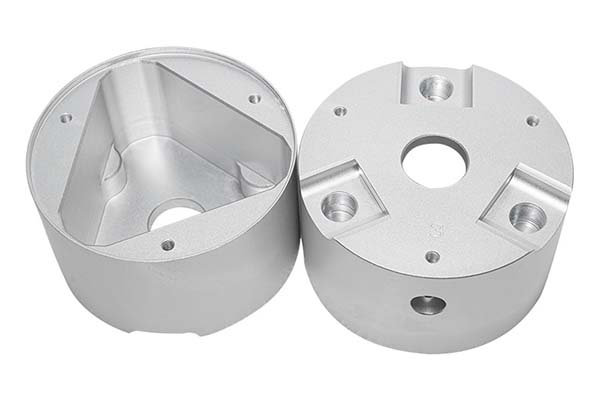
Prototype processing is that nerve-wracking step where your digital design becomes a physical part for the first time. It’s exciting, sure, but it’s also where small mistakes turn into big problems. One overlooked detail can mean weeks of delays or thousands of dollars down the drain. I’ve seen it happen more times than I can count.
Key takeaways
- Here’s something that might surprise you: the most important part of prototype processing happens before any machine ever starts cutting.
- Good communication with your manufacturing partner makes or breaks prototype projects.
- Designing with manufacturing in mind from the start saves headaches later.
- The material you choose affects everything—performance, appearance, cost, and how long processing takes.
Why Does Pre-Processing Preparation Matter So Much?
Here’s something that might surprise you: the most important part of prototype processing happens before any machine ever starts cutting. I learned this lesson the hard way early in my career when I rushed a design into production only to discover critical flaws halfway through machining.
The numbers back this up too. A product development study found that projects with thorough pre-processing planning are 37% more likely to hit quality targets and 28% more likely to stay on schedule. That’s a massive difference just from taking time upfront.
What Should Your Design Review Cover?
Before anything else, sit down with your 3D models and 2D drawings like you’re a detective looking for trouble. You want to spot potential problems before they become real problems.
Look for features that might be difficult or expensive to produce. Walls that are too thin (under 0.5mm for most plastics) often cause warping or breakage. Complex undercuts might require special tooling you haven’t accounted for. Tolerances that are tighter than necessary drive up costs without adding real value.
I always ask myself: “If I had to machine this part myself, what would give me headaches?” That simple question has saved me countless times.
How Do You Pick the Right Manufacturing Process?
Your choice between CNC machining, 3D printing, injection molding, or other methods isn’t just about what’s popular right now. Each process has strengths and weaknesses that matter for your specific project.
CNC machining gives you excellent precision and material properties, but it has geometric limitations. 3D printing handles complex shapes beautifully but may leave surface finishes that need extra work. Injection molding is great for testing production feasibility but requires expensive tooling upfront.
Match the process to your prototype’s purpose. A visual concept model might be perfect for 3D printing. A functional part that needs to handle stress probably wants CNC machining with real engineering materials.
How Can You Align Expectations With Your Manufacturer?
Good communication with your manufacturing partner makes or breaks prototype projects. I’ve seen beautiful designs turn into disappointing parts simply because the designer and machinist weren’t speaking the same language.
What Should You Discuss Before Processing Starts?
Start with a clear conversation about your prototype’s purpose. Is this just for looks? Does it need to survive real testing? Will it assemble with other parts? These answers guide everything that follows.
When you hand over design files, use industry-standard formats like STEP or IGES. These preserve all your geometry without the confusion that can come from native CAD formats. And don’t just send files—walk through them with your manufacturer. Point out the critical features, explain what matters most, and ask for their input.
Why Do You Need Written Agreements?
Here’s a stat that might convince you to formalize your arrangements: projects with formal manufacturing agreements experience 40% fewer disputes and resolve issues 25% faster when problems do come up.
Your agreement should spell out:
- Technical specifications and quality standards
- Delivery timeline with clear milestones
- Pricing structure and payment terms
- How modifications or rework get handled
- Who’s responsible for material sourcing
Think of this document as your safety net. When questions arise later—and they will—you have something to reference that keeps everyone aligned.
What Drawing Requirements Absolutely Must Be Enforced?
Your drawings are the instruction manual for creating your prototype. Every dimension, tolerance, and note gets translated into machine movements and tool paths. If something’s unclear in the drawing, it’ll be wrong in the part.
Which Dimensions Need the Most Attention?
Critical dimensions deserve special focus. These are the features that matter for fit, function, or assembly. For high-precision components, tolerances might be as tight as ±0.01mm. Less critical features might be fine at ±0.1mm.
Geometric dimensioning and tolerancing (GD&T) helps avoid ambiguity here. Instead of just saying “this hole needs to be here,” GD&T defines exactly what “here” means relative to other features.
Surface roughness matters too, especially for parts that move against each other. Sliding surfaces often need a smoother finish around Ra 0.8μm or lower, while non-functional surfaces might be fine at Ra 3.2μm or higher.
How Do Secondary Processes Affect Dimensions?
This is a trap that catches many designers. You design a part to exact dimensions, then send it for painting or plating, and suddenly things don’t fit anymore.
Powder coating typically adds 0.02-0.05mm to surface thickness. Anodizing adds about 0.01-0.03mm. These numbers might seem tiny, but on precision parts they matter.
Either adjust your design dimensions to account for these additions or specify that critical surfaces should be masked during finishing. Your future self will thank you.
| Specification Type | Typical Tolerance Range | What Happens If Ignored | How to Verify |
|---|---|---|---|
| Linear Dimensions | ±0.01mm to ±0.1mm | Parts don’t fit together | Calipers, micrometers, CMM |
| Surface Roughness | Ra 0.8μm to Ra 6.3μm | Too much friction, ugly finish | Surface roughness tester |
| Hole Positioning | ±0.02mm to ±0.05mm | Holes misalign in assembly | Coordinate measuring machine |
| Wall Thickness | ±0.1mm to ±0.2mm | Parts too weak or too heavy | Ultrasonic thickness gauge |
How Can You Design for Easier Manufacturing?
Designing with manufacturing in mind from the start saves headaches later. It’s much cheaper to adjust a digital model than to redo physical machining after problems appear.
What Design Principles Actually Help?
Simplify complex features that don’t add real value. That decorative lattice pattern might look cool, but if it doubles machining time and increases material waste, ask yourself if it’s worth it.
Design for your chosen process. CNC parts benefit from generous fillets and radii that allow standard tool sizes. 3D printed parts need consideration of overhang angles and support structures. Know your process and design accordingly.
Use standard sizes for holes and threads whenever possible. Special sizes mean special tooling, which means higher costs and longer lead times.
Why Should You Avoid Mid-Process Design Changes?
Here’s a sobering statistic: design changes requested after processing begins can increase costs by 50-200% compared to changes made during the design phase. I’ve watched simple modifications turn budget-friendly projects into financial nightmares simply because of timing.
Validate your design’s manufacturability upfront. Run design reviews, do feasibility studies, use digital simulations. Find problems while they’re still just pixels on a screen, not chips on the shop floor.
What Goes Into Smart Material Selection?
The material you choose affects everything—performance, appearance, cost, and how long processing takes. Pick wisely based on what your prototype actually needs to do.
What Material Properties Actually Matter?
Start with functional requirements. Does your prototype need strength? Flexibility? Heat resistance? Chemical resistance? Match these needs to material properties.
Consider appearance needs if visual appeal matters. Some materials take paint beautifully. Others have natural colors or textures that might work as-is.
Think about processing compatibility. Your chosen material needs to play nice with your manufacturing method. ABS machines easily but can warp with heat. Stainless steel offers great strength but requires specialized tools and more machining time.
How Do You Match Materials to Applications?
Here’s a quick reference based on common prototype needs:
- ABS Plastic: Impact-resistant, good dimensional stability. Great for consumer product prototypes and enclosures. Easy to machine and paint, but watch out for heat warping.
- Aluminum Alloy: Lightweight, strong, conducts heat well. Perfect for aerospace components and heat sinks. Machines beautifully and anodizes nicely for surface protection.
- Stainless Steel: Corrosion-resistant with high strength. Ideal for medical devices and industrial components. Harder to machine than aluminum, so factor in extra time.
- Polycarbonate: Transparent and impact-resistant. Use for light covers and lenses. Prone to scratching, so handle with care during processing.
- Nylon: Flexible and wear-resistant. Great for gears, hinges, and moving parts. Absorbs moisture, which can affect dimensions if not accounted for.
How Do You Get Colors Exactly Right?
For prototypes where appearance matters, color accuracy becomes surprisingly complicated. I’ve seen projects derailed because the final color looked nothing like what the designer expected.
What Makes Color Matching So Tricky?
First, different materials take color differently. That perfect red paint on ABS plastic might look darker or brighter on polycarbonate. Always test on your actual material.
Lighting conditions change how colors appear. A prototype that looks perfect under office lights might look completely different in natural daylight or under manufacturing floor lighting. Specify which lighting standard you’re using for evaluation—D65 daylight or TL84 office lighting are common choices.
How Can You Ensure Color Consistency?
Use industry-standard color systems like Pantone, RAL, or CMYK values. Avoid subjective descriptions like “sky blue” or “forest green” that mean different things to different people.
Request color swatches or test samples before full prototype processing. This verification step costs little but prevents major disappointments.
Work with manufacturers who use spectrophotometers for precise color measurement. These instruments can achieve accuracy up to ΔE < 1, where lower numbers mean better color matching. Human eyes are good at spotting color differences, but instruments are better at preventing them.
Why Is Structural Verification Essential?
After processing, you need to confirm that your prototype actually works as intended. This step identifies problems before you commit to expensive production tooling.
What Does Good Verification Include?
Dimensional inspection using precision tools verifies that critical dimensions meet specifications. For complex prototypes, a coordinate measuring machine (CMM) provides detailed 3D measurement.
Assembly testing reveals fit issues that individual part measurements miss. Holes that line up on paper might not align in reality. Parts that measure correctly individually might interfere when assembled.
Functional testing subjects prototypes to real-world conditions. Load testing, temperature cycling, impact testing—whatever makes sense for your application.
Visual inspection catches surface defects, cosmetic issues, and inconsistencies that affect appearance or perceived quality.
How Do You Handle Problems When You Find Them?
Document issues clearly and work with your manufacturer to find root causes. Is the problem in the design? Material choice? Processing method? Addressing root causes prevents the same issues from recurring in future prototypes.
Prototypes that undergo formal structural verification have a 60% higher success rate in subsequent production stages compared to those that skip this step. That’s a compelling reason to take verification seriously.
What Makes CNC Prototype Machining So Precise?
CNC machining offers exceptional precision when properly controlled, which is why it’s the go-to choice for functional prototypes that need to demonstrate exact fit and performance.
How Do You Maintain Precision Throughout Machining?
Regular equipment calibration keeps machines accurate within 0.001mm or better. Think of calibration like tuning a musical instrument—small adjustments make a big difference in final performance.
Optimized tool paths from advanced CAM software minimize vibration and tool deflection. These microscopic movements might not look like much, but they show up in final dimensions.
Appropriate cutting parameters match speeds, feeds, and depths to your specific material and tooling. What works for aluminum won’t work for stainless steel or plastic.
Controlled environmental conditions matter more than you might think. Temperature fluctuations of just a few degrees can affect precision machining. Ideal conditions keep temperatures steady around 20-22°C with vibration isolation for high-precision work.
What Actually Causes Most Machining Errors?
Here’s what I’ve learned from years of watching CNC projects: most errors trace back to design or setup issues, not equipment limitations.
Inadequate fixturing lets parts move during machining, ruining accuracy. Improper tool selection for the material leads to poor finishes and dimensional errors. Design features that create tool access challenges force compromises that affect quality. Insufficient allowances for material shrinkage or tool wear mean final dimensions miss their targets.
Address these proactively and your CNC machining will deliver exceptional results.
How Can You Make Prototype Processing More Efficient?
Efficiency improvements throughout the process reduce lead times, lower costs, and improve quality. And no, efficiency doesn’t mean cutting corners—it means eliminating waste and unnecessary steps.
What Strategies Actually Work?
Optimize design for batch processing when producing multiple prototypes. Smart nesting reduces setup time and material waste.
Prioritize critical features by focusing precision and resources where they matter most. Non-critical areas might not need the same level of attention.
Leverage digital tools like simulation software to identify and resolve processing issues virtually. Finding problems in software is always cheaper than finding them in metal.
Streamline approval processes with clear criteria that keep decisions moving. Waiting for approvals causes delays that compound throughout the project.
Maintain material inventory by working with manufacturers who stock common prototype materials. Material sourcing delays are frustrating and completely avoidable.
What Kind of Improvements Can You Expect?
Smart efficiency improvements typically deliver 15-30% faster turnaround times and 10-20% lower costs without sacrificing quality. Plus, efficient processes reduce environmental impact by minimizing material waste and energy consumption.
What Does Good Quality Control Look Like?
Quality control isn’t a one-time inspection at the end. It’s an ongoing process that starts with design and continues through delivery.
Where Should You Place Quality Checkpoints?
Pre-processing review verifies design files, material specifications, and process plans before production starts. This is your last chance to catch problems before they become expensive.
In-process inspections check dimensions, surface finish, and feature quality during machining. Early detection means easier correction.
Post-processing verification inspects after secondary operations like painting, coating, or assembly. Make sure these steps haven’t introduced new problems.
Final acceptance testing evaluates everything against specifications before you sign off on the finished prototype.
Why Document Quality Results?
Detailed records of inspections, measurements, test results, and photos provide valuable insights for future prototypes. They help identify recurring problems that need systemic solutions rather than quick fixes.
Manufacturers with robust quality control systems typically achieve 95% or higher first-pass yield rates for prototype processing. That means 19 out of 20 prototypes meet specifications without needing rework—a benchmark worth aiming for.
Successful prototype processing comes down to preparation, communication, and attention to detail at every step. Start with thorough planning and design review. Choose materials and processes that match your prototype’s purpose. Communicate clearly with your manufacturing partner and formalize agreements. Enforce drawing requirements while designing for manufacturability. Verify results through structured testing and quality control.
Each of these steps matters. Skip one and you risk delays, cost overruns, or prototypes that don’t meet your needs. Follow them all and you’ll get accurate, functional prototypes that validate your designs and move your product development forward.
Remember that prototype processing is a partnership between you and your manufacturer. The best results come when both sides understand the requirements, communicate openly about challenges, and work together toward the shared goal of a successful prototype.
Our solution for Watch Out
YiguProto runs rapid prototyping in house, from a single prototype to a production batch. We quote the process, the material and the finish as separate lines, so you can see where the money goes instead of arguing with one number.
Send a STEP file or a drawing and you get a DFM report in one to two business days. It flags the features that add cost and the features that will not hold tolerance on the process you picked.
Every order ships with an inspection report on the features you call out. If a part misses, we make it again. Ready to price a part? Start with a free quote and DFM review, or read more about our rapid prototyping. You can also talk to an engineer before you commit to a drawing.
FAQ about Watch Out
What files do you need in order to quote?
A STEP file plus a PDF drawing that carries the same revision letter. The model carries the geometry and the drawing carries the intent. When the two disagree, the shop picks one, and it is never the one you meant.
What is Watch Out used for?
Watch Out turns up wherever the part has to do a real job at a predictable cost: brackets, housings, fixtures, covers and the fittings that hold them together. The honest test is whether the properties match the load and the environment, not whether the material is fashionable.
What happens if a part is out of specification?
We measure it against the same drawing you approved and, if it misses, we make it again. What matters is that the report exists, because a disagreement without data is just an opinion.
Can Watch Out be made in small quantities?
Yes, and small quantities are where a good supplier earns the next order. Setup dominates the price at low volume, so the cheapest route is usually the one with the fewest operations, not the cheapest material.
What tolerance can you hold on Watch Out?
The working default is ±0.1 mm on most processes, tighter after machining. Tighter than that the process changes and so does the price, because every step tighter adds inspection time. Call out only the faces that mate with something else and leave the rest on the general tolerance.
What should I check before approving the parts?
Datums first, then the features that mate, then the cosmetic faces. Ask for a dimensional report, a material certificate and a finish sample. A part can be inside every tolerance and still not fit, so assemble one before you sign.
The short version
Watch Out rewards the buyer who reads the data sheet and the drawing together. Pick the option for the property that matters, not for the price per kilo.
Tighten only what mates. Test a sample before the run. Then let the process do the rest.