
Blogs
What Are Real Disadvantages of CNC Machining for Your Shop?
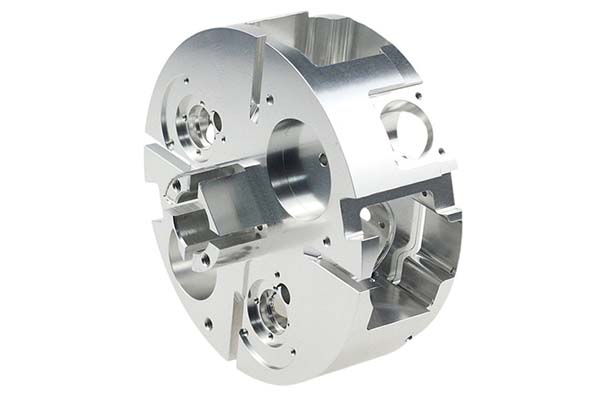
CNC machining dominates modern manufacturing. From aerospace components to automotive parts, these computer-controlled machines deliver precision that manual operations cannot match. But here is the truth that equipment sellers rarely mention: CNC disadvantages can significantly impact your bottom line if you do not plan carefully. This guide pulls back the curtain on the real drawbacks of CNC technology.
Why Look Beyond the Hype of CNC Machining?
The Promise vs. The Reality
Manufacturing media celebrates CNC machining for good reason. These machines hold tolerances within ±0.001 inches. They run unattended for hours. They produce identical parts shift after shift.
But every technology comes with trade-offs. The table below presents a balanced view:
| Advantages | Disadvantages |
|---|---|
| Exceptional precision and repeatability | High purchase price and upkeep costs |
| Scales well for high-volume production | Physical size limits on workpieces |
| Consistent quality with minimal errors | 30-70% material waste typical |
| Efficient for large production runs | Struggles with complex organic shapes |
| Works with many materials | Expensive mistakes from bad programming |
| Reliable for long production cycles | Not ideal for extremely hard/brittle materials |
| Reduces direct labor for repetitive jobs | Long setup times delay production starts |
| Safer than manual operation | Severe shortage of skilled workers |
Understanding these CNC disadvantages helps you plan around them. Let us examine each one in detail.
How Much Does CNC Machining Really Cost?
The Sticker Shock of Initial Investment
The first barrier for most shops is price. CNC machining requires serious capital.
Entry-level CNC mills start around $10,000 but offer limited capability. Industrial-grade machining centers suitable for aerospace or medical work easily exceed $500,000. According to the Association for Manufacturing Technology, average prices for production-ready CNC equipment rose 12% in 2024 alone.
But the machine is just the beginning. You also need:
- CAD/CAM software: $5,000 to $20,000 annually for licenses and updates
- Tooling: End mills, drills, inserts—figure $1,000-$5,000 yearly for small shops
- Facility modifications: Reinforced floors, three-phase power, compressed air systems
- Workholding: Vises, fixtures, clamps specific to your parts
The Ongoing Expenses Add Up
CNC disadvantages include significant operating costs. Regular maintenance—spindle servicing, lubrication, software updates—runs 5-10% of the machine’s value every year. A $200,000 machine costs you $10,000 to $20,000 annually just to keep it running right.
Case in point: A custom furniture maker in Ohio bought a $35,000 CNC router in 2023. After adding $8,000 for software and $12,000 for shop upgrades, they struggled to find enough work. Eighteen months later, they sold the machine at a 40% loss. The numbers looked good on paper but did not match their actual order volume.
What Size Parts Can You Actually Make?
The Work Envelope Reality
Every CNC machine has a work envelope—the maximum part size it can handle. A standard vertical mill typically offers 30″ x 16″ x 12″ of travel. Exceed those dimensions, and the part simply will not fit.
Larger machines exist, but they cost dramatically more. A big-format CNC router offering 10′ x 5′ travel might run 2-3 times the price of standard equipment. This is one CNC disadvantage that forces tough choices.
When Size Becomes a Deal-Breaker
Industries producing large components face particular challenges. Construction equipment manufacturers, marine fabricators, and heavy machinery shops all need to machine big parts.
Consider a Texas construction equipment maker. They needed to produce small hydraulic components (3″ x 2″) alongside large frame parts (6′ x 4′). Their solution? Buy two machines—a standard mill for small work and a $250,000 large-format machining center for the big stuff. Equipment costs doubled, and floor space became tight.
Where Does All the Material Go?
The Waste Problem in Subtractive Machining
Most CNC machining is subtractive—you start with a solid block and cut away everything that is not part of the final design. This inherently creates waste.
Industry data from AMI Manufacturing Insights shows typical material waste runs 30-70%. For complex parts, the numbers climb even higher. Imagine machining a titanium medical implant from a 2″ cube. The finished part might weigh just 20% of the starting block. Titanium costs around $30 per pound, so that 80% waste represents $12 in lost material for each part. Make 10,000 parts, and you have thrown away $120,000 worth of metal.
Environmental and Financial Impacts
Beyond direct cost, material waste carries environmental consequences. Producing metals and plastics consumes huge energy. Recycling helps but also requires energy and may not capture all scrap.
For companies with sustainability goals, this CNC disadvantage creates real tension. You want precision manufacturing, but you also want to minimize environmental footprint.
Can CNC Make Any Shape You Want?
The Geometry Challenge
CNC machining loves regular shapes—holes, slots, flat surfaces, threads. It struggles with organic, free-form geometries.
The problem is simple physics. Cutting tools are rigid metal rods spinning at high speed. They move in straight lines or smooth arcs. They cannot reach into deep undercuts or wrap around complex curves without specialized equipment.
When Standard Machines Fall Short
Consider a medical device company developing a hip implant with bone-like surface texture. Their standard 3-axis CNC mill could not reproduce the required organic geometry. The solution required a $400,000 5-axis machine and a specialized programmer earning $95,000 annually.
This CNC disadvantage forces design compromises. Engineers must design for manufacturability, adapting ideal shapes to what machines can actually produce.
How Bad Is a Programming Mistake?
The High Cost of Human Error
CNC machining follows instructions blindly. A single wrong coordinate, a missed tool change, an incorrect feed rate—the machine executes exactly what you told it, even if that means crashing into the workpiece.
A 2024 survey by Quora’s Manufacturing Community found 68% of CNC operators experienced a significant programming error in the past year. Average cost per error: $2,300, counting wasted material, broken tools, and lost production time.
Real-World Disaster Stories
An aerospace supplier in California learned this lesson the hard way. A programming error caused their CNC mill to drill holes 0.005 inches off-center in titanium engine components. The mistake went undetected until 50 parts were complete. Those 50 titanium parts—each worth $1,500—ended up as scrap. Total loss: $75,000 in material alone, plus 48 hours of downtime while correcting the program.
Simulation software helps catch errors before cutting starts, but complex parts and new materials still trip up even experienced programmers. This CNC disadvantage keeps shop managers awake at night.
What Materials Cause Problems?
The Hard Stuff
CNC machining handles many materials well—aluminum, steel, brass, plastics, composites. But extremely hard materials like tungsten carbide or ceramic composites push machines to their limits.
These materials require specialized cutting tools—diamond-tipped inserts that cost many times standard tooling. Cutting speeds must drop to preserve tool life. Spindle wear accelerates. Tool replacement costs skyrocket.
The Brittle Stuff
Brittle materials present different challenges. Glass, ceramic, and cast iron tend to chip, crack, or shatter under CNC cutting forces. Machine vibrations that barely affect metal parts can destroy brittle workpieces.
A glass manufacturer attempting custom lenses found 25% of their parts cracking during machining. Their solution required $15,000 in vibration-damping equipment and 40% slower cutting speeds. Production costs soared.
How Long Does Setup Really Take?
The Hidden Time Sink
CNC machining shines once running, but getting there takes time. Setup includes programming the machine, installing tooling, calibrating workholding, and proving out the program.
For complex parts, expect 2-8 hours of setup. High-precision work like medical implants can require 12-24 hours before cutting the first production part.
When Setup Eats Your Schedule
A Chinese consumer electronics manufacturer learned this lesson painfully. They needed 100,000 aluminum phone cases for a new product launch. CNC setup took 16 hours—programming, custom fixtures, tool calibration. That two-day delay pushed back product release, costing an estimated $200,000 in lost sales and damaging retail relationships.
For small batches under 100 parts, setup time often exceeds actual machining time. This CNC disadvantage makes short runs uneconomical compared to manual methods or 3D printing.
Why Is Finding Operators So Hard?
The Skills Gap Reality
CNC machines do not run themselves. They need skilled operators who understand CAD/CAM software, G-code, tool selection, material properties, and machine maintenance. Programmers must translate 3D designs into efficient tool paths and troubleshoot when things go wrong.
The problem? These people are scarce. U.S. Bureau of Labor Statistics data shows roughly 60,000 unfilled CNC positions nationwide. That shortage drives up wages—skilled operators average $28 per hour, 25% above typical manufacturing pay. Senior programmers command over $40.
Small Shops Feel the Pinch Most
A Pennsylvania machine shop spent three months searching for a qualified CNC programmer in 2023. Meanwhile, orders piled up. They eventually outsourced programming at 30% higher cost than in-house staffing would have been.
This CNC disadvantage hits small businesses hardest. Large manufacturers offer competitive salaries and clear career paths. Smaller shops struggle to attract and retain top talent.
How to write a spec that gets priced correctly
A drawing is a contract. If it leaves a number open, the shop fills that number in with its own default. The default is rarely the one you had in mind. Put these five lines on every RFQ and most of the back-and-forth disappears before it starts.
- A model and a drawing that agree
- Material by standard number
- Tolerance only where it mates
- Finish and the faces it applies to
- Quantity and required date
The point is not paperwork. Each line removes a decision the shop would otherwise make for you. A complete RFQ comes back priced. An incomplete one comes back guessed.
What actually drives the price
Buyers usually push on material because it is the line they can see. In practice the material is rarely the biggest number on a quote. These five lines decide most of it:
- process choice
- material
- tolerance band
- finish
- volume
Ask for the quote split by line. A supplier who cannot break it down is guessing, and you will pay for the guess. The line you can usually renegotiate is the tolerance band, not the raw material.
Problems you will meet, and the fix
Every process has a failure mode it prefers. The same four show up again and again on this kind of work, and none of them are mysteries once you know what to look for.
- A drawing that contradicts the model
- A tolerance with no datum
- A cosmetic callout with no approved sample
- A quote compared against a different scope
Catch the fault on the first part, not the hundredth. A first-article check costs an hour. A bad batch costs the whole order. Write the check into the purchase order so nobody has to remember it.
What to check on the first article
The first article is the cheapest inspection you will ever buy. Use it properly and the rest of the run becomes boring, which is exactly what you want.
- Every dimension on the drawing, with the measured value written beside it.
- The material certificate, matched to the heat or lot number on the parts.
- The finish against the sample you approved, under the same light.
- Fit against the mating part, assembled rather than measured.
- Packaging, because parts that arrive damaged were never in tolerance.
Check in this order: datums, then mating features, then cosmetic faces. If the datums are wrong, every number after them is noise. Keep the report on file. When a problem shows up in month six, that document is the only thing that tells you what changed.
How to compare two quotes fairly
Two numbers are not comparable unless the scope matches. Line them up before you decide, because a low number with three gaps is not a low number.
Same drawing, same material, same finish, same inspection. Anything else is a different job wearing the same part number. Then look at what each quote leaves out. Freight, packaging, certificates and tooling are the usual gaps.
Ask each supplier to state their assumptions in writing. The one who does is usually the one who has run the process before.
Scaling from one part to a batch
The first part teaches you the process. The hundredth teaches you the process cost.
Watch three things as volume grows: setup amortisation, tool wear, and how much hand work the finish still needs. If the unit price barely moves between ten and a hundred, the cost sits in material or in hand work, not in setup. Ask which, because only one of them is negotiable.
Lead time behaves the same way. A one-off is scheduled around other jobs. A repeat order is scheduled around your forecast. Give the shop a forecast and the lead time gets shorter, not longer.
How Can You Work Around These Disadvantages?
Smart Strategies for Cost Management
Leasing equipment instead of buying reduces upfront pain. Monthly payments for standard machines run $200-$1,000. Cloud-based CAD/CAM software offers pay-as-you-go pricing. Invest in longer-life tooling like carbide inserts to control ongoing expenses.
Solutions for Size Restrictions
Consider modular machines that allow work envelope expansion. For occasional large parts, outsource to specialized vendors rather than buying oversized equipment you rarely need.
Reducing Material Waste
Use nesting software to optimize part placement on each blank. Recycle scrap through local facilities. Choose blanks sized as close to final parts as possible.
Overcoming Design Limitations
Combine CNC machining with 3D printing for complex geometries. Print the difficult core, then machine critical surfaces. For high-volume complex parts, evaluate 5-axis investment against outsourcing costs.
Preventing Programming Errors
Run simulation software before every new program. Implement dual-review for critical work. Train operators to recognize common errors and stop machines immediately when something looks wrong.
Handling Difficult Materials
Match cutting tools to material challenges—diamond inserts for hard stuff, reduced speeds for brittle work. Consider vibration-damping fixtures and pre-heating treatments to improve results.
Shortening Setup Times
Invest in quick-change tooling and workholding systems. These can cut setup time 50%. Create standardized templates for common parts. Program offline while machines run other jobs.
Addressing Labor Shortages
Partner with technical schools for apprenticeship programs. Invest in user-friendly software that reduces learning curves. Offer competitive pay and clear advancement paths to retain skilled workers.
Our solution for Real Disadvantages
YiguProto runs custom manufacturing in house, from a single prototype to a production batch. We quote the process, the material and the finish as separate lines, so you can see where the money goes instead of arguing with one number.
Send a STEP file or a drawing and you get a DFM report in one to two business days. It flags the features that add cost and the features that will not hold tolerance on the process you picked.
Every order ships with an inspection report on the features you call out. If a part misses, we make it again. Ready to price a part? Start with a free quote and DFM review, or read more about our custom manufacturing. You can also talk to an engineer before you commit to a drawing.
FAQ about Real Disadvantages
What is the lead time for Real Disadvantages?
Expect 5 to 15 business days depending on process. Tooling, material stock and the finishing queue all move that number, so we confirm the date in writing before the run starts rather than after.
Does the process work for prototypes as well as production?
Yes, and that is usually the point. Running the prototype on the production process removes a whole class of surprises, because the part you test is made the same way as the part you sell.
Can Real Disadvantages be made in small quantities?
Yes, and small quantities are where a good supplier earns the next order. Setup dominates the price at low volume, so the cheapest route is usually the one with the fewest operations, not the cheapest material.
What should I check before approving the parts?
Datums first, then the features that mate, then the cosmetic faces. Ask for a dimensional report, a material certificate and a finish sample. A part can be inside every tolerance and still not fit, so assemble one before you sign.
What is Real Disadvantages used for?
Real Disadvantages turns up wherever the part has to do a real job at a predictable cost: brackets, housings, fixtures, covers and the fittings that hold them together. The honest test is whether the properties match the load and the environment, not whether the material is fashionable.
How much does Real Disadvantages cost?
Price comes from five lines: material, machine or tool time, setup, finishing and inspection. The material itself is usually the smallest of them. Send a drawing and we will split the quote so you can see which line is doing the damage.
The short version
Real Disadvantages rewards the buyer who reads the data sheet and the drawing together. Pick the option for the property that matters, not for the price per kilo.
Tighten only what mates. Test a sample before the run. Then let the process do the rest.